
Sogni Create for Web and Android
Sogni Create for Web is the shared codebase behind app.sogni.ai and the Android app on Google Play. Sign in from any modern desktop or mobile browser, or install the Android app for a Play Store-managed mobile shell around the same Sogni Create workspace. Either way, you get the same image, video, and music toolkit backed by the Sogni Supernet — no local GPU required.
Forgot your username or password? Follow the Web & Android sign-in recovery guide to find saved credentials in Chrome, Safari, Edge, Firefox, and other password managers on desktop or mobile.
#Launch Sogni Create on Web →
#Get Sogni Create on Google Play →
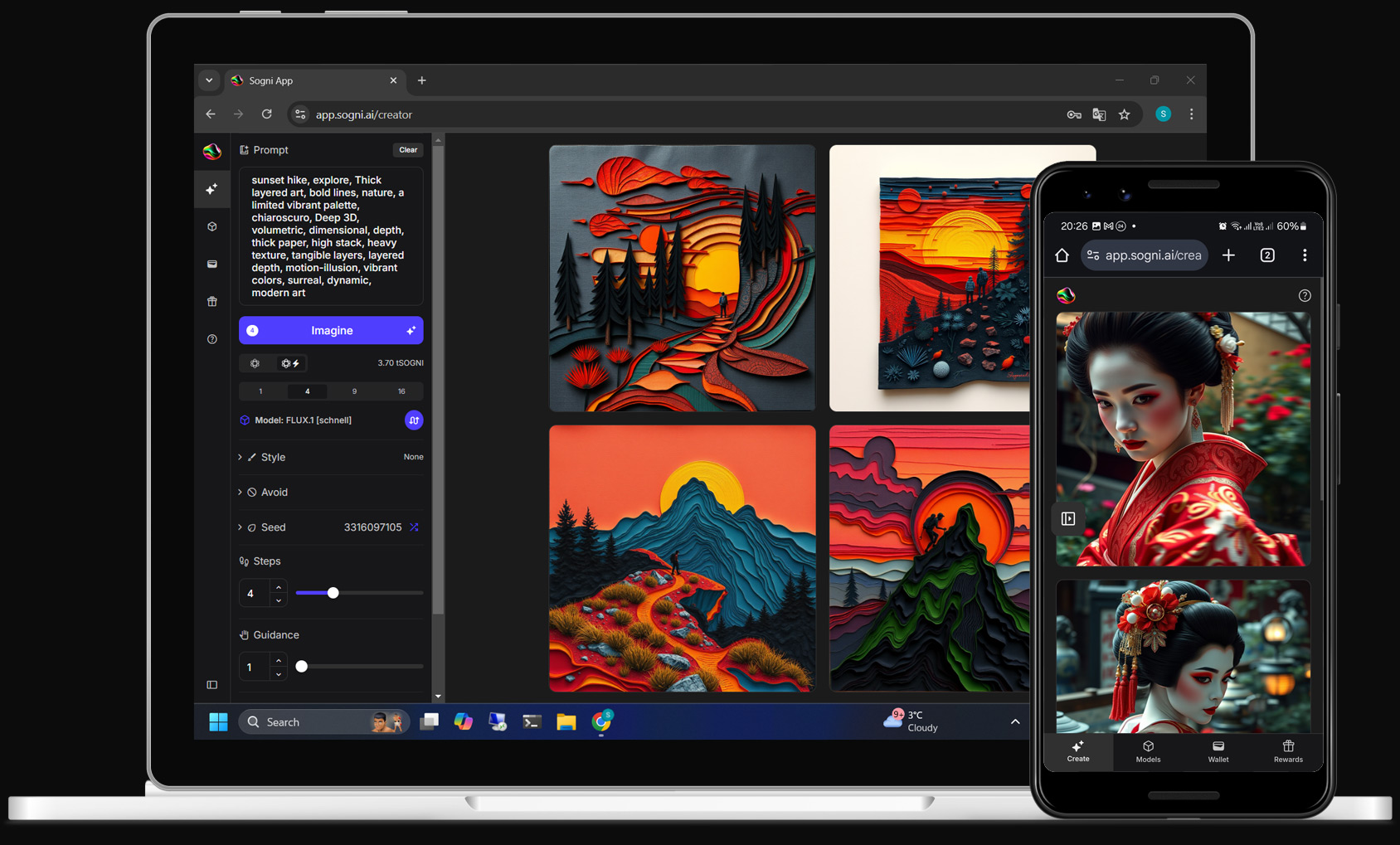
#What it does
- Cross-platform. Runs on Windows, macOS, Linux, ChromeOS, iPad, and Android browsers, plus the Android app on Google Play. Same UI, same account, same gallery.
- Zero-install web, store-installed Android. Open a browser tab when you want no install, or install from Google Play when you want launcher access and app-store updates on Android.
- One account everywhere. Your prompts, gallery, balance, and Spark Points sync with Pocket and Studio — start a render in the browser or Android app, finish it on your phone or Mac.
- Powered by the Sogni Supernet. Jobs are dispatched to a distributed worker network, so a low-end laptop renders as fast as a workstation.
#Features
The web and Android app share most of their feature set with Studio, so behavior is documented once there and the same behavior applies here. The top-level tabs are Create, Video, Music, Recent Projects, Wallet, and Rewards.
- Image generation (Create) — text-to-image, image-to-image, batches, dynamic prompts, and an AI Prompt Creator that drafts prompts for the currently selected model.
- Video generation (Video) — Sogni-native and premium hosted model families exposed from the Video home page:
- LTX-2.3 — Text→Video, Image→Video, and Sound→Video. Up to 4K, 60 fps, with native audio generation.
- WAN 2.2 — Text→Video, Image→Video, Motion Transfer (drive a character from a reference video) and Replace Subject (keep the scene, swap the subject). Up to 1,048,576 pixels per frame (1024×1024, or 1280×720 widescreen), 32 fps.
- Seedance 2.0 — premium hosted full, Fast, and Mini tiers for text, image, audio, and video-reference workflows. Use the full tier when a 4K render is required.
- Seedance 2.5 — latest premium hosted Seedance tier and current storyboard default: 4–30 second clips with an expanded multimodal reference budget at 480p, 720p, or 1080p (no 4K).
- HappyHorse 1.1 — premium hosted text-to-video, image-to-video, and image-reference video with native synchronized audio.
- MiniMax H3 — Standard, Balanced, LightX2V Turbo, and FastH3 Turbo for text-to-video, image-to-video, and first/last-frame video, plus Reference-to-Video and FastH3 Sound to Video, with synchronized stereo audio. The Keyframes block pins up to eight more images at exact moments inside an Image to Video, Sound to Video, or Reference to Video clip, so you can storyboard it shot by shot; see Intermediate keyframes.
- Music generation (Music) — full songs with AI-written lyrics, instrumentals, or short loops, powered by MiniMax Music 3 (up to 300 seconds, a ceiling the song may end before) and the ACE-Step model family (10–600 seconds, with controls for BPM, key, scale, and time signature), plus a curated library of musical-style presets. See Creating audio.
- ControlNet — pose, depth, canny, and other guidance maps driven by reference images for ControlNet-capable models.
- Qwen Image Edit — when a
qwen_image_edit_*model is selected, the Create tab exposes Qwen reference-image controls for instruction-style image editing. - LoRAs and My LoRAs — on Krea 2, Qwen Image Edit 2511, and MiniMax H3 models, open LoRAs → Browse LoRAs (Manage LoRAs once some are attached) to stack up to 8 LoRAs; the order matters. Unlimited members can also open My LoRAs (Beta), paste a public Hugging Face
.safetensorsfile link or a Civitai model or version link, name it, confirm permission to use it, and Import. Imported LoRAs show only while the Sensitive Content Filter is off. See Personal LoRAs for file requirements and limits. - Image enhancement — per-result enhance menus add Light / Medium / Heavy passes with Krea 2 Turbo, Z-Image Turbo or FLUX.1 [schnell], plus camera-angle / perspective tools.
- Model picker — browse the full Sogni model catalog (Krea 2 Turbo, SD 1.x / 2.x, SDXL, SD3, Flux, Z-Image, Qwen Image Edit, WAN, LTX-2.3, Seedance 2.0, Seedance 2.5, and HappyHorse 1.1) and switch with a click. See Models.
- Generation settings — steps, guidance, scheduler, seed, aspect ratio, and other generation controls map 1:1 with Studio.
- Recent Projects, Wallet, Rewards — full project history, balance and spend tracking, and the Rewards / Spark Points program in the same tab strip.
Surfaces that exist in Studio but not on web or Android include the in-app Chat assistant, on-device CoreML rendering, .sogni project files, the Activity window, the multi-track Clip Mixer, and Worker Mode. Use Studio or Studio Pro if you need those.
#Workflows
Quick start. Sign in, type a prompt, hit Imagine. The default model and settings are tuned for fast first-try results.
From phone to desktop. Start a generation on mobile during a commute, open the same gallery on your desktop browser later, and enhance or remix without re-uploading anything.
Shared sessions. Because everything lives in your Sogni account, switching between the web app, the Android app, Pocket, and Studio mid-project just works — no export step.
#Install options
app.sogni.ai is a Progressive Web App. On supported browsers you'll see an Install prompt the first time you visit — accept it (or use your browser's Install app / Add to Home Screen menu) to get:
- A standalone window with the Sogni Create icon, no browser chrome.
- An icon on your desktop dock, app launcher, or phone home screen.
- A service-worker-backed offline page when the network drops.
On Android, the Google Play app is the recommended install path when you want a dedicated app entry, store updates, and a mobile app shell around the same Sogni Create web experience. The PWA remains useful when you want Sogni Create without a store install.
#Tips
- Use Chrome, Safari, Edge, or Firefox. WebSocket support and modern JS are required; very old browsers won't connect to the Supernet.
- Mobile is fully featured. The shared app reflows to a touch UI on phones with its own mobile toolbar.
- Install the Android app or PWA (see above) when you want it to feel like a dedicated app instead of a browser tab.
- Need Worker Mode or on-device rendering? That's Studio Pro — web and Android render on the Supernet.
#See also
- Sogni Create: Pocket — native iPhone and iPad app.
- Sogni Create on Google Play — Android app using the same Sogni Create web codebase.
- Sogni Create: Studio — native macOS app and shared feature documentation.
- Creating images, Creating videos, Creating audio, and Models — feature deep-dives that apply to web and Android.
- Sogni Supernet — the distributed network that renders every job.