
Sogni: Learn logo

Creative Agent Skill

The Sogni Creative Agent Skill plugs the Sogni Supernet into the agent runtime you already use — Claude Code, OpenClaw, Hermes Agent, Manus AI, and others. It ships as a Node CLI (sogni-agent), a SKILL.md source any skill-aware agent can load, and a published OpenClaw plugin.

#npm: @sogni-ai/sogni-creative-agent-skill →
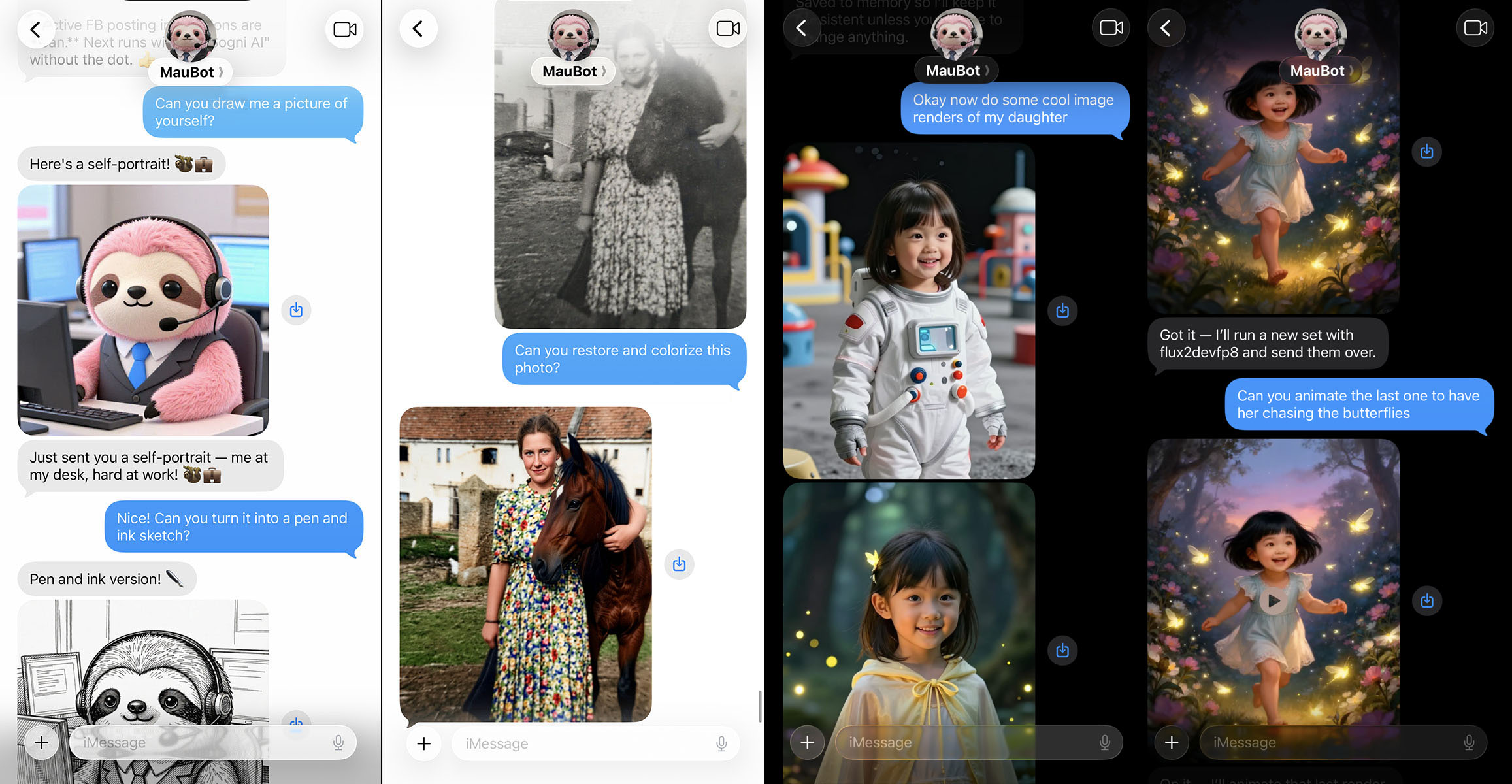
Creative Agent Skill rendering an image in a chat

#What it does

  • Image generation and editing. Quality presets (-Q fast|hq|pro) pick the right model/steps/size; gpt-image-2, Flux 2 Dev, Z-Image Turbo, and Qwen Image Edit are first-class.
  • Video generation. Text-to-video, image-to-video, sound-to-video, audio-to-video, video-to-video, and animate workflows — auto-routed across LTX-2.3, WAN 2.2, and Seedance 2.0 with native dialogue and audio.
  • Music. Direct instrumental or full-song generation with lyrics, BPM, key, and time-signature controls.
  • Hosted creative workflows. /v1/chat/completions with Sogni creative-agent tools and /v1/creative-agent/workflows durable workflows including a storyboard-video preset.
  • Durable chat and replays. --durable-chat maps to /v1/chat/runs, while --list-replays, --get-replay, and --ingest-replay expose redacted Sogni Intelligence RunRecords for debugging.
  • Personas, memory, personality. Saved reference photos and voice clips (--persona), persistent preferences (--memory-set), and per-agent personality (--personality-set) survive across sessions at ~/.config/sogni/.
  • Per-skill loading. Hosts can load the root SKILL.md or focused skills/*.md manifests for image, video, music, media analysis, persona/memory, app settings, composition planning, session control, and asset-reference management.
  • Token auto-fallback. --token-type auto tries free Spark first and falls back to SOGNI when Spark runs out.

#Install

#Node CLI (default)

npm install -g @sogni-ai/sogni-creative-agent-skill@latest
sogni-agent --version

Then point your agent runtime at this repo's SKILL.md. For agents that fetch over HTTPS, llm.txt is the condensed install/setup reference.

The Sogni Intelligence docs keep the API-focused reference for this package, including the alpha release track and diagnostic flags: Sogni Creative Agent Skill.

#OpenClaw plugin

openclaw plugins install sogni-creative-agent-skill

OpenClaw reads defaults from openclaw.plugin.json; CLI flags always override.

#Hermes Agent / Manus / other frameworks

Install the CLI globally as above and point the agent at SKILL.md. The agent invokes sogni-agent directly.

#Setup

Get an API key from dashboard.sogni.ai and save it:

mkdir -p ~/.config/sogni
echo 'SOGNI_API_KEY=your_api_key' > ~/.config/sogni/credentials
chmod 600 ~/.config/sogni/credentials

Or export SOGNI_API_KEY in the environment.

#CLI at a glance

# Image
sogni-agent -Q hq -o dragon.png "a dragon eating tacos"

# Edit existing image
sogni-agent -c subject.jpg "add a neon cyberpunk glow"

# Photobooth face transfer
sogni-agent --photobooth --ref face.jpg "80s fashion portrait"

# Text-to-video with dialogue
sogni-agent --video 'A narrator says "welcome to the story" as ocean waves crash'

# Seedance 2.0 (4–15s, native audio)
sogni-agent --video -m seedance2 --duration 8 "A polished product reveal"

# Direct music
sogni-agent --music --duration 30 "uplifting cinematic synthwave"

# Storyboard → Seedance video sequence (durable workflow)
sogni-agent --api-workflow storyboard-video --storyboard-frames 7 --duration 12 -Q hq \
  "Create a 9:16 bakery launch video with a neon street-window reveal"

# Hosted chat with creative-agent tools
sogni-agent --api-chat "Create a 4-shot product video concept for a red sneaker"

Add --json for machine-parseable success/error payloads in agent contexts. --last reads the previous render's metadata.

#Workflows

Storyboard to video. --api-workflow storyboard-video generates a storyline, renders a GPT Image 2 storyboard sheet, then drives Seedance from that sheet as the visual reference — one command produces a multi-shot video.

Persona-driven generation. Save a face photo and voice clip with --persona-add, then every image or video with --persona <name> injects the reference and (for video) the voice identity automatically.

Local segment + concat. Generate two video clips with --video-start offsets, then --concat-videos out.mp4 clip-1.mp4 clip-2.mp4 --concat-audio song.mp3 stitches them with ffmpeg locally.

Sogni Intelligence replays. --list-replays and --get-replay <id> expose redacted RunRecord storage for debugging hosted runs.

#Tips for getting started

  • Lead with -Q, not -m. Quality presets map to known-good models, steps, and sizes. Use -m when you have a reason.
  • Use --api-workflow for durable work, --api-chat for conversation. Workflows persist with event streaming and cancellation; chat is best for natural-language exploration.
  • Cost-cap durable workflows. --workflow-max-cost <n> rejects starts above a capacity-unit ceiling; --confirm-cost requires explicit billing confirmation.
  • Respect SSRF defaults. The CLI rejects localhost and private-network URLs before forwarding to hosted models; only public HTTPS references are forwarded as Seedance multimodal context.
  • Don't generate bootstrap scripts. When upgrading from inside an agent, run npm install -g …@latest directly. Inline bash -c clone-or-pull scripts trip sandboxes and stall.

#See also