
Manage or Cancel Sogni Unlimited
In the Sogni web app, the action that cancels subscription renewal is called Downgrade to Free. You can cancel renewal of a monthly or annual Sogni Unlimited or Unlimited Pro subscription at any time.
For an active paid subscription, downgrading turns off the next renewal. Your plan benefits remain active until the access end date shown by your billing provider; then your account automatically returns to Free. Your account, creations, and existing Spark balance are not deleted.
Canceling during a free trial stops renewal and keeps your remaining trial access. This applies to web/Stripe, the App Store, and Google Play. Cancel before the original trial end date to avoid the first charge, even if you cancel right away. The trial still ends on its original date and keeps the same limits: up to 120 images and 15 videos per day, including up to 6 MiniMax H3 videos. Daily allowances reset at midnight UTC; video length limits also apply. Cancellation does not reset trial eligibility.
Where you subscribed determines where you complete the downgrade:
| Subscription provider | Where to finish | Button you will see |
|---|---|---|
| Web / Stripe | Sogni Wallet, then Stripe's secure billing portal | Manage billing (or Manage plan), then Cancel subscription |
| Apple App Store | Apple subscription management | Cancel Subscription |
| Google Play | Google Play subscription management | Cancel subscription |
| Crypto (USDC / USDT) | Nothing to do — the plan never renews | — |
Uninstalling a Sogni app does not cancel its subscription. Complete the steps with the billing provider that originally charged you.
Paid with crypto? There is nothing to cancel. A crypto-paid plan is prepaid and never renews, so it simply ends on your paid-through date and your account returns to Free. Sogni emails you a reminder 7 days, 3 days, and on the day of expiry if you want to extend it.
Did Sogni email that your trial ended because the card verification hold was declined? Your trial has already been canceled automatically, so there is nothing else to cancel and Manage billing or Update Plan may no longer appear. You were not charged and no first subscription payment is scheduled. Your trial remains available to restart with another eligible card. A verification email saying the check is incomplete is different: it does not confirm cancellation. Reply to that email for help.
The verification may appear at your bank as SOGNI* NO CHARGE (wording varies). Sogni never collects the verification hold. We request release immediately after the check, but your bank may take a few business days to remove a pending item. See the free-trial card verification FAQ.
Still on the trial acknowledgment screen? Choose Cancel trial setup to abandon setup before continuing to Stripe. No verification hold is requested and no trial starts. This is different from canceling renewal after a trial has successfully started.
#Before you downgrade
- Paid plan: You keep your current plan benefits until the access end date shown by Stripe, Apple, or Google Play. Future renewals stop after the provider confirms cancellation.
- Web plan with a failed payment: If a payment has failed and Stripe is retrying it, downgrading ends the subscription right away. The retries stop, the unpaid invoice is voided, and your account moves to Free. Plan access is already paused while a payment is failing, so you lose no paid time.
- Crypto-paid plan: No action is needed. The plan does not renew, and access ends on your paid-through date.
- Web free trial: Downgrading during a Stripe/web trial prevents the first charge and keeps trial access until the original trial end date. If what you actually want is regular plan allowances sooner, you do not need to cancel — select End trial & start paid plan in Wallet & Billing instead; it converts the same subscription to paid today.
- Apple or Google Play trial: Canceling in the store prevents the conversion charge and keeps trial access until the original trial end date. An uncanceled store trial converts to paid automatically at the end of the trial period. Store trials cannot be converted to paid early; End trial & start paid plan is web-only.
- After the access end date: Unlimited generation is no longer included. Future generations use pay-as-you-go Spark, and the plan limits and benefits shown in the confirmation screen are removed.
- Your data and balance: Your Sogni account, creations, and existing Spark balance remain available.
- Refunds: Cancellation does not automatically refund the current billing period. See the Cancellation and Refund Policy.
#Web subscription (Stripe)
The following steps apply while the web trial or paid subscription is still active.
Can't sign in to Sogni? You can still cancel a web (Stripe) subscription. Open the email titled Your Sogni free trial ends soon and select Manage billing without signing in. The link works for 45 days after the email was sent and opens Stripe's secure billing portal, where you can select Cancel subscription. Anyone with that link can manage your billing, so don't forward the email. If you no longer have it, or the link has expired, email [email protected] with your Sogni username and we will stop the renewal for you.
#Step 1: Open your Sogni Wallet
Sign in to Sogni Create, then open app.sogni.ai/wallet.
#Step 2: Open your subscription settings
On your subscription card, select Manage billing to open Stripe's secure billing portal. Depending on the app version or layout, this action may be labeled Manage plan. If Update Plan is also shown, use Manage billing for cancellation; Update Plan is for changing your Sogni tier or billing interval.
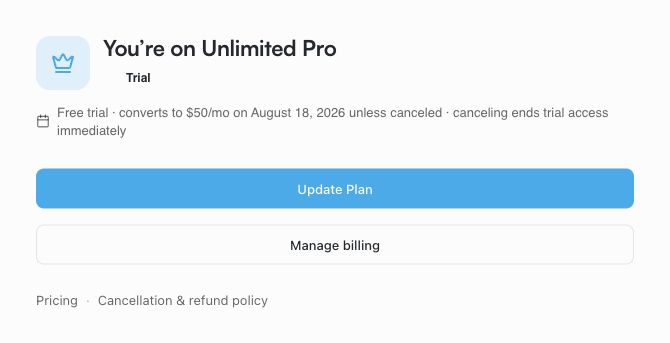
For a web trial, select Manage billing to open Stripe's cancellation controls.
#Step 3: Confirm in Stripe
In the Stripe billing portal, select Cancel subscription, then follow the prompts to confirm your cancellation.
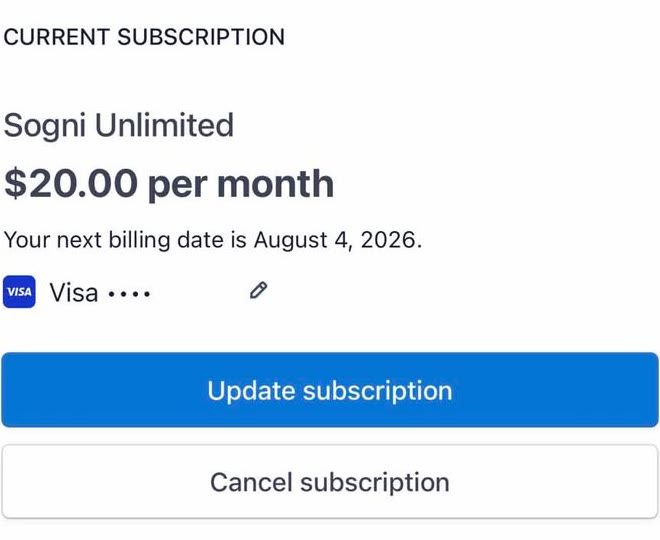
Select Cancel subscription and confirm when prompted.
Once Stripe confirms the cancellation, your subscription will no longer renew. If you cancel during a web free trial, the first charge is prevented and trial access continues until its original end date, with the same limits. If you cancel an active paid plan, Sogni Wallet shows that the plan is ending and the access end date; you can use Resume renewal before that date if you change your mind.
#Apple App Store subscription
In the Sogni iOS app, tap Manage on your active subscription plan to open Apple's subscription management. From the Sogni web dashboard, use Manage in App Store. You can also manage the subscription manually:
- Open Settings on your iPhone or iPad.
- Select your name / Apple Account.
- Select Subscriptions.
- Select the Sogni subscription.
- Select Cancel Subscription and confirm.
You can also open Apple subscription management. Apple shows the effective date and is the source of truth for cancellation.
Need a refund for an Apple purchase? Cancellation does not request a refund. You must submit the request to Apple; Sogni support cannot issue Apple-billed refunds for you. Follow Cancel an Apple Subscription and Request a Refund for screenshots, refund steps, and status tracking.
#Google Play subscription
Use the Manage in Google Play action in Sogni, or manage the subscription manually:
- Open Google Play and confirm that you are signed in to the Google Account used for the purchase.
- Open your profile menu, then Payments & subscriptions → Subscriptions.
- Select the Sogni subscription.
- Select Cancel subscription and follow Google's prompts.
On a computer, open Google Play subscriptions, select Manage for the Sogni subscription, then cancel and confirm. Google shows the effective date and applies its own cancellation and refund rules.
#What happens after cancellation
- Sogni Wallet shows the plan as Ending after the billing provider reports the cancellation.
- Paid Unlimited access continues until the access end date shown by the billing provider.
- On the effective date, your account returns to Free and future generations use pay-as-you-go Spark.
- Your account, creations, and Spark balance remain available.
- You receive no further renewal charge unless you resume or start a new subscription.
#Subscribe again
You can rejoin Sogni Unlimited at any time. Return to app.sogni.ai/wallet and select Subscribe. If a canceled paid plan is still active, use Resume renewal or the original provider's subscription management before the access end date.
For plan features, billing details, and subscription terms, see Sogni Unlimited Plan Details.