

Sogni 360 & Montage
Two cinematic modes in one app. Montage stitches your photos and clips into epic travel and event recaps. 360 turns a single still into a smooth orbital video. Together they make any moment feel directed.
#Sogni Montage
Sogni Montage is the travel-video and highlight-reel mode of Sogni 360. You bring a stack of stills from a trip, an event, or a campaign and arrange them in order; Sogni generates short AI Transitions between every pair of frames so the stills play as continuous motion. You set the clip duration on each scene — that's where pacing comes from — and re-roll any scene with prompt feedback until the motion lands the way you want. The Supernet runs the renders in parallel batches so a full montage comes back in one pass instead of one cut at a time.
It's the fastest way to take a camera-roll dump from a weekend (or a two-week vacation) and turn it into something people actually want to watch.
#Featured Montages
#Sogni 360
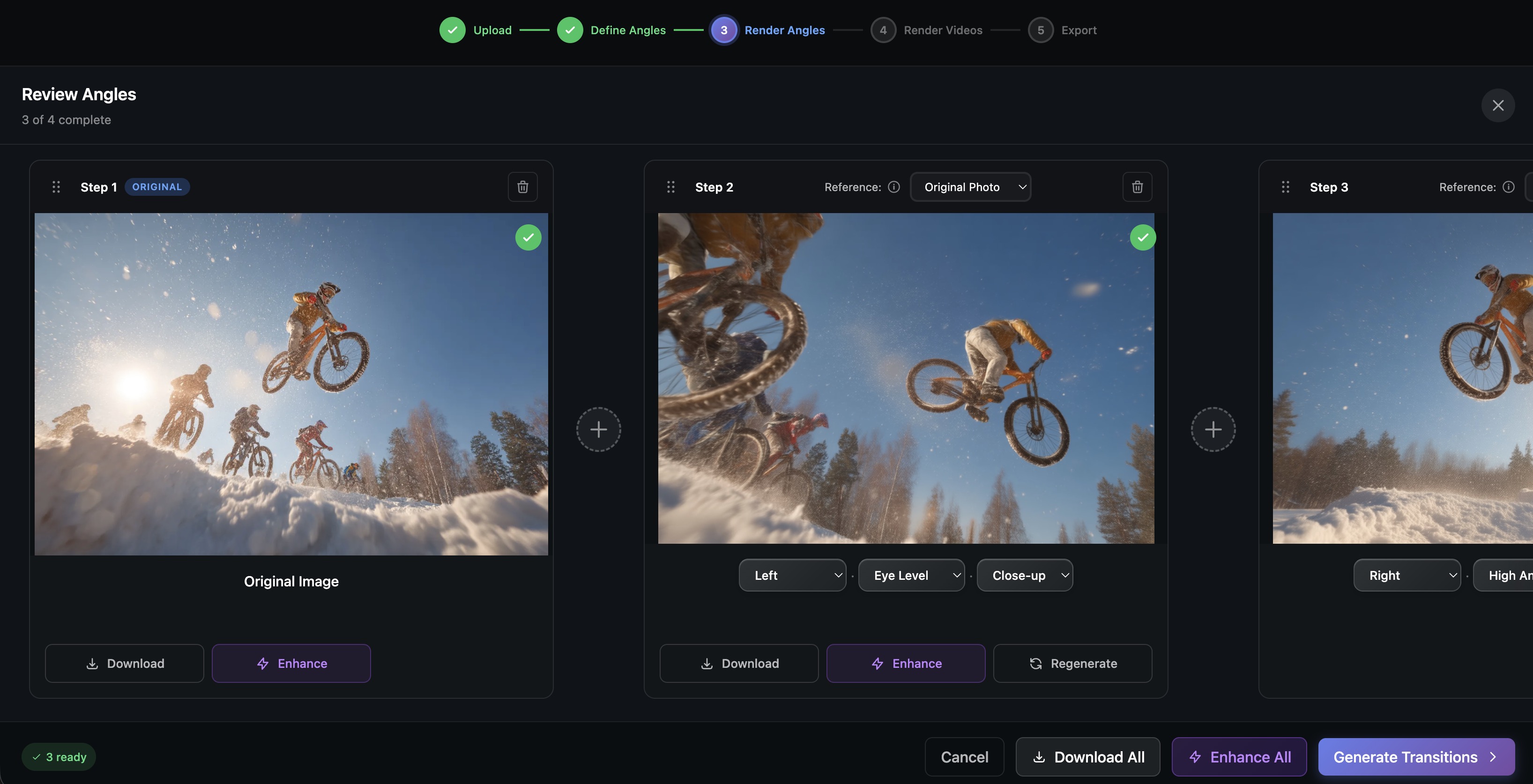
Sogni 360 turns a single still image into a seamless 360-degree orbital video. Upload a photo, pick the angles you want, and the Sogni Supernet re-renders the same subject from up to 96 camera positions, then stitches AI-generated transitions between them. No 3D scan, no rig, no GPU.
#Launch Sogni 360 →
#What it does
- 96 camera angles from a single source image — 8 azimuths (front, front-right, right, back-right, back, back-left, left, front-left) × 4 elevations (low-angle -30°, eye-level 0°, elevated 30°, high-angle 60°) × 3 distances (close-up, medium, wide). Up to 64 waypoints per project.
- Qwen Image Edit 2511 + Multiple Angles LoRA for the angle re-renders — Lightning tier for fast scouting, full 2511 for higher fidelity. Subject identity, lighting, and clothing stay consistent across the orbit.
- Two transition model families, switchable per project:
- WAN 2.2 — proven quality, four steps (Fast and Balanced run the LightX2V distilled variant; High Quality and Pro run the full WAN 2.2 14B). 16fps base, post-interpolated to 32fps. 1–8s per clip.
- LTX-2.3 — next-gen model with synchronized audio generation (foley + ambient, woven into the prompt automatically — not music). Native 24fps, up to 20s per clip, longer durations than WAN. Minimum 640p.
- Resolutions 480p, 580p, 640p, 720p, 1080p (LTX-2.3 starts at 640p; WAN 2.2 tops out at 720p because it renders at most 1,048,576 pixels per frame, or 1024×1024).
- AI-expanded transition prompts. Pick a motion style; a Sogni Intelligence VLM analyzes the two end frames and rewrites the preset into a scene-aware, model-tuned prompt (the LTX-2.3 path bakes in the required audio cues automatically).
- Sound-to-video on the final stitched video. Pick a track from the preset music library to lay over the assembled orbit.
- Batch generation of every angle in parallel, with per-angle regeneration when one comes back off.
- Full-screen immersive viewer with click zones, swipe, keyboard shortcuts, and auto-play.
Sogni 360 is built on the Sogni Client SDK. The same 3D camera-angle remap powers the angle remix feature inside Sogni Photobooth for Web and Android.
#Preset templates
Two layers of presets so you don't dial settings from scratch.
Camera-angle templates seed a project with a curated set of waypoints:
- Simple Zoom Out (2 angles) — original + zoomed-out wide.
- Zoom Out 360 (9) — full eye-level rotation in 45° steps, returning to the start frame for a clean loop.
- Zoom Out 360 (4) — same idea in 90° steps for a faster, choppier orbit.
- Zoom Montage (4 angles) — original plus three dynamic angles mixing high, low, and wide for a more cinematic cut.
- Portrait Trio (4 angles) — original, three-quarter left and right, and an elevated front shot. Designed for character sheets and portrait turnarounds.
- 360 Spin Close (9) — close-up eye-level orbit in 45° steps.
- 360 Spin High+Wide (9) — high-angle wide orbit for landscapes, architecture, and product hero shots.
- 360 Spin Random (9) — varied elevations and distances for documentary or storytelling cuts.
AI Transition prompt presets set the motion style the video model targets between waypoints:
- Camera Orbit (default) — smooth orbital motion between angles of the same scene. Best for orbit and turnaround templates.
- Cinematic Morph — dynamic on-lens transition with brief natural occlusion. Best when the two end frames are different photos (Montage-style cuts).
- Parallax Zoom — epic depth-layered dolly-zoom reveal, foreground sliding past, midground drifting, background steady.
- Parallax Zoom 2 — cinematic pull-back variant of Parallax Zoom with softer easing.
Either preset can be overridden inline — write your own prompt and the VLM still expands it scene-aware against the two end frames.
#360 workflows
Action sport hero shot. Upload a clean freeze-frame — a BMX rider mid-trick, a surfer in the barrel — pick Zoom Out 360 (9), and you get a loopable orbit you can export for Instagram or TikTok. Switch to LTX-2.3 for the export if you want crowd noise, wind, or wave foley baked in.
Vehicle reveal. Drop in a single car photo, run a 360 Spin High+Wide for the establishing pass, then a Camera Orbit at eye-level for the hero loop. WAN 2.2 Pro for client-deliverable cuts; LTX-2.3 when the deliverable needs engine and wind ambience.
Character turnaround. Use Portrait Trio on a Photobooth portrait to build a consistent character sheet without rerolling identity. Cinematic Morph between the front and three-quarter frames gives the sheet a film-still feel.
Architecture and product spins. Generate the angle batch from a hero render, regenerate any individual angle that drifts, then export the orbit as a video loop for product pages, listings, or 3D-style previews. Add a music preset for social-cut versions, or LTX-2.3 if you want the space's room tone to play under the spin.
#Tips
- One clear subject. The Multiple Angles LoRA works best when the subject is well separated from the background — busy scenes can confuse the re-projection. Lightning tier is fine for scouting; switch to the full Qwen Image Edit 2511 for final angle renders that need to hold up close.
- Pick the model family for the deliverable, not just the speed. WAN 2.2 wins on raw motion quality and is the default; LTX-2.3 wins when you need synchronized audio in the output, longer clips (up to 20s), or native 24fps without post-interpolation.
- Let the AI expand the prompt. The preset prompt is fine, but the VLM-expanded version reads both end frames and writes targeted camera, lighting, and (on LTX-2.3) audio cues. The expanded prompt is editable before render — tune it once and reuse across the orbit.
- Generate the still batch first, transitions second. Cheap to explore angles, expensive to render video — lock the angles you like before spending steps on transitions.
- Regenerate, don't restart. If one angle or transition comes back wrong, regenerate just that waypoint instead of rerunning the whole orbit.
- Match the transition preset to the source. Use Camera Orbit when adjacent waypoints are AI-generated angles of the same scene; switch to Cinematic Morph for Montage-style cuts between different photos.
- Use Fast for scouting, Pro for the final loop. Same workflow pattern as Photobooth — explore on Fast (LightX2V on WAN 2.2, or LTX-2.3 Fast for audio previews) and finalize on Pro.