
FLUX 3 Image Klein
Sogni runs FLUX 3 Image Klein, the fast 5.6B open-weights version of Black Forest Labs' FLUX 3 Image, on the Sogni Supernet. On one RTX 5090 it renders a 1024×1024 image in about 1.9 s and edits a photo in about 3.6 s (see Speed). One model covers three jobs:
- Text-to-image from a prompt alone.
- Image-to-image from a start image, with a strength that sets how closely the result follows it.
- Edits and compositions guided by one to ten reference images.
Example renders and a comparison with Sogni's other open image models are on the FLUX 3 Image Klein model page. Side-by-side renders and timings against the Krea 2, Qwen and Z-Image models are in FLUX 3 Image Klein Speed Test on the Sogni blog.
#Speed
Measured on one NVIDIA RTX 5090 with each model already loaded, at each model's default steps. Time in the app also includes the queue and transfers.
| Job | FLUX 3 Image Klein | Other fast models on Sogni |
|---|---|---|
| 1024×1024 text-to-image | about 1.9 s | Z-Image Turbo 2.5 s, Qwen Image 2512 Lightning 3.2 s, Krea 2 Turbo 3.7 s |
| One-photo edit, about 1 megapixel | about 3.5–3.7 s | Qwen Image Edit 2511 Lightning 7.8–8.6 s, Krea 2 Identity Edit 9.3–10.2 s |
| One-photo edit, 2 / 4 megapixels | 8.3 s / 22.1 s | — |
| Edit combining ten reference images | about 37 s | Not supported (Qwen Image Edit takes up to 3, Krea 2 Identity Edit up to 2) |
| 3840×2160 / 4096×4096 text-to-image | 27 s / 94 s | — |
Klein is fast partly because it is small: 5.6 billion parameters (per Black Forest Labs), against 12 billion for Krea 2 (per Krea) and 20 billion for Qwen Image (per Qwen). In Sogni's tests, the larger models still did better on some fine details.
#Workflow ID
| Surface | Value |
|---|---|
| Model ID (API, SDKs, Sogni Agent CLI) | flux3_image_klein_sd_int8_convrot |
Creative tools selector (generate_image and edit_image) |
flux-3-klein |
| Creator and license | Black Forest Labs, FLUX Kommunity License |
#Limits
| Setting | Values |
|---|---|
| Width and height | 256–4096 px in steps of 16; default 1024×1024 in the API and SDKs, about 2 megapixels in Sogni Web and the creative tools |
| 4K presets (text-to-image) | landscape_4k (3840×2160), portrait_4k (2160×3840), square_4096 (4096×4096) |
| One-photo edit size | Up to 4 megapixels (4,194,304 px), for example 2048×2048, 2352×1776 or 2720×1536 |
| Steps | 4–16; default 16 |
| Negative prompt | No effect; leave it empty |
| Sampler | euler (default) or er_sde |
| Scheduler | simple |
| Reference images | Optional, up to 10 (contextImages) |
| Start image | Optional (startingImage with startingImageStrength); not combined with reference images |
| LoRAs | Your own imported LoRAs (personal LoRAs, Unlimited plans); no catalog LoRAs yet |
Renders larger than 2048×2048, including the 4K presets, run on 32 GB GPUs and take longer (see Speed). The 4K presets are for text-to-image; send a one-photo edit at the photo's own size, up to 4 megapixels.
#Personal LoRAs
Sogni Unlimited members can import their own FLUX 3 Image Klein LoRAs from Civitai or Hugging Face in My LoRAs in Sogni Web, or through the personal LoRA API. LoRAs are specific to a model family: Krea 2 and Qwen Image Edit LoRAs don't work with Klein, and Klein LoRAs don't work with them. A LoRA's strength starts at the value its author used in the Civitai example images, or 1 when there is none.
#Reference images
- Order matters. Refer to references by position in the prompt: "the first image", "the second image", and so on. In the SDK the first entry of
contextImagesis the first image. - How references are sized. A single reference keeps its own shape and is used at up to about 4 megapixels, never enlarged. With two or more, each is reduced to at most 1 megapixel. The output size is the
widthandheightyou send, not the size of a reference. - Edit one photo at its own shape. Send the photo's own size (multiples of 16, up to about 4 megapixels) so everything outside the edit stays put; a different shape, such as a square from a wide photo, makes the model recompose the scene. Sogni Web and the creative tools choose that size for you.
- A start image or references, not both. The reference-image workflows have no start-image input, so send
startingImageorcontextImagesin one render. Sogni Web stops a render that carries both and asks you to remove one. - More references cost more. Each one adds render time, and the estimate includes it (see Pricing).
#Layout boxes
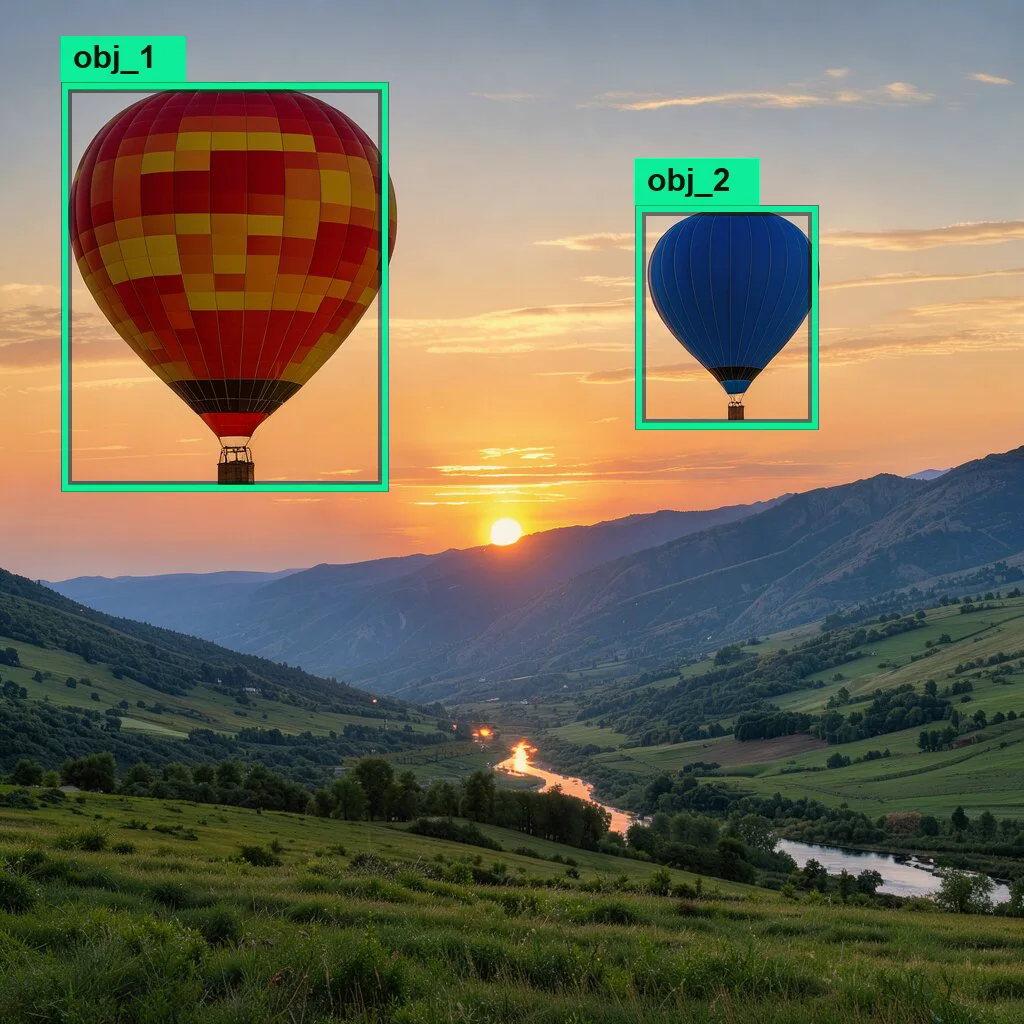
FLUX 3 Image Klein places elements where you mark them. Tag each element in the prompt with an id in angle brackets, then end the prompt with a JSON list of boxes. Coordinates are [top, left, bottom, right] on a 0–1000 grid measured from the top-left corner. Boxes guide placement and size; they are not exact masks.
In a new image, each box has an id, a bbox and a short desc:
... a large hot-air balloon <obj_1> floats over the valley, while a smaller blue hot-air balloon <obj_2> hangs farther back on the right ... [{"id": "obj_1", "bbox": [80, 60, 480, 380], "desc": "A large red and yellow striped hot-air balloon"}, {"id": "obj_2", "bbox": [200, 620, 420, 800], "desc": "A small blue hot-air balloon with a tiny brown basket"}]
In Sogni Web, Layout Composer (Compose by layout) draws new-image layouts on a canvas and writes this format for you. See the Layout Composer guide.
In a one-photo edit, call the photo <ref_image_0>. Each box has an id, from, src_bbox (where the object is now), tgt_bbox (where it goes) and desc:
| Edit | from |
src_bbox |
tgt_bbox |
|---|---|---|---|
| Add | "target" |
null |
Where it goes |
| Move or resize | "ref_image_0" |
Where it is now | Where it goes |
| Remove | "ref_image_0" |
Where it is now | null |
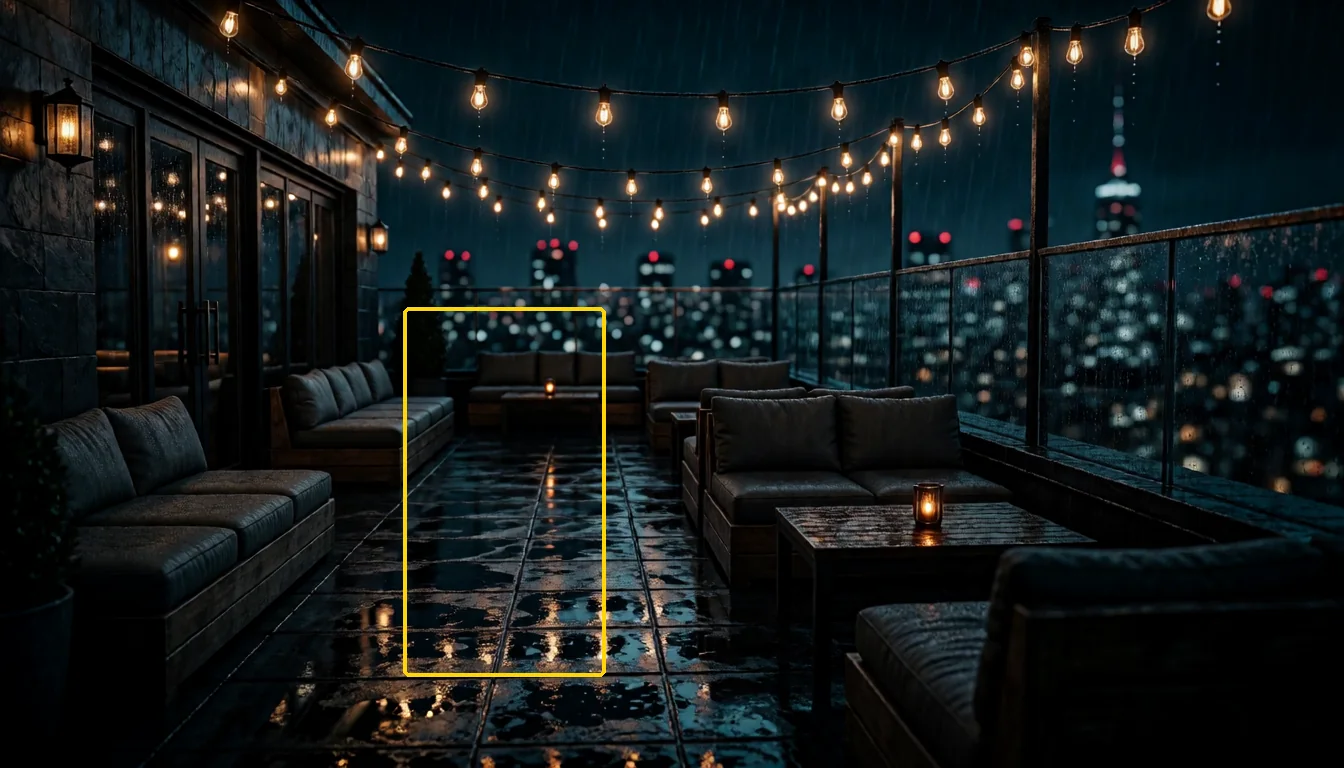
In <ref_image_0>, add a potted olive tree <tree_1> on the wet floor between the sofas. Keep the rest of the image completely unchanged.

[{"id": "tree_1", "from": "target", "src_bbox": null, "tgt_bbox": [400, 300, 880, 450], "desc": "a potted olive tree in a terracotta pot"}]
tree_1 drawn on it.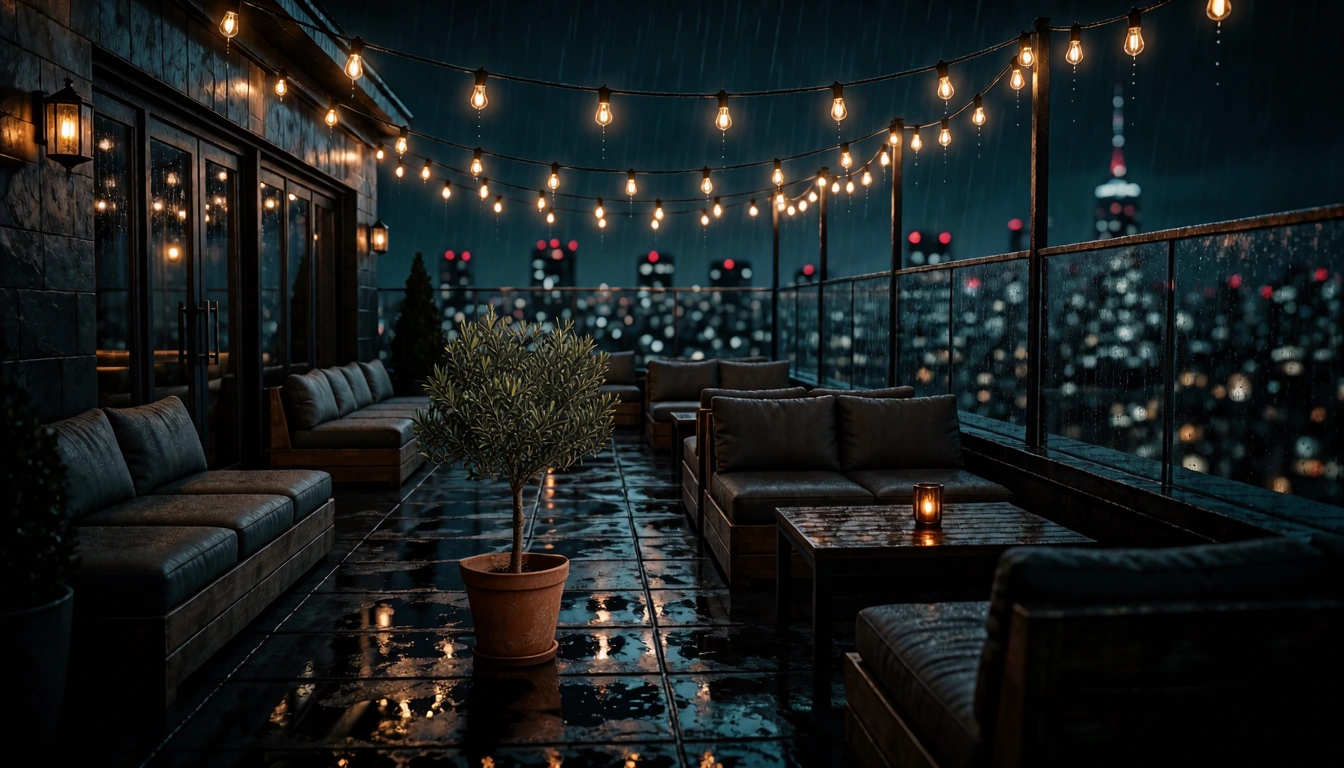
One edit per render gives the most reliable result.
In Sogni Web you don't have to write boxes by hand: choose FLUX 3 Image Klein, attach one photo, turn on Edit by box, and draw up to three boxes, choosing Add object, Move or resize or Remove object for each. Sogni writes the prompt in this format, and you can still edit it.
#Prompting
- In Sogni Web, short prompts are expanded for you. A FLUX 3 Image Klein render runs the Prompt Enhancer first: a short prompt becomes a full scene caption, and an edit instruction is folded into a caption of the photo. Prompts already written as a full caption, and Edit by box renders, are sent as they are. Turn off Auto, under the Enhance button, to send your words exactly as typed.
- Write a full scene caption. Black Forest Labs trained the model on long, detailed captions, and its model card notes that short prompts produce generic output. Describe the subject, framing, setting, lighting, and style in plain sentences rather than a list of keywords.
- Put exact text in quotes. Quote the words you want in the image and say where they go and how they look, for example
wood type: 'THE LOW TIDES' very large at the top, below it 'with special guests' small(the poster below). Ending with "nothing else written" keeps stray lettering out. Large display type is the most reliable; Black Forest Labs notes that rendered text can be inaccurate, so check small print at full size. - Say what each reference contributes. Name in the prompt what to take from each image, such as a face, a product, a room, or a palette, and how they come together.
- Say what stays the same. For an edit, add what must not change, such as the background, the light, and the framing.
- Phrase exclusions positively. Ask for "a clean, empty desk" rather than "no clutter"; a negative prompt has no effect on Klein.
- Trade steps for speed. 16 steps is the default; fewer steps, down to 4, render faster with less fine detail and cost proportionally less.
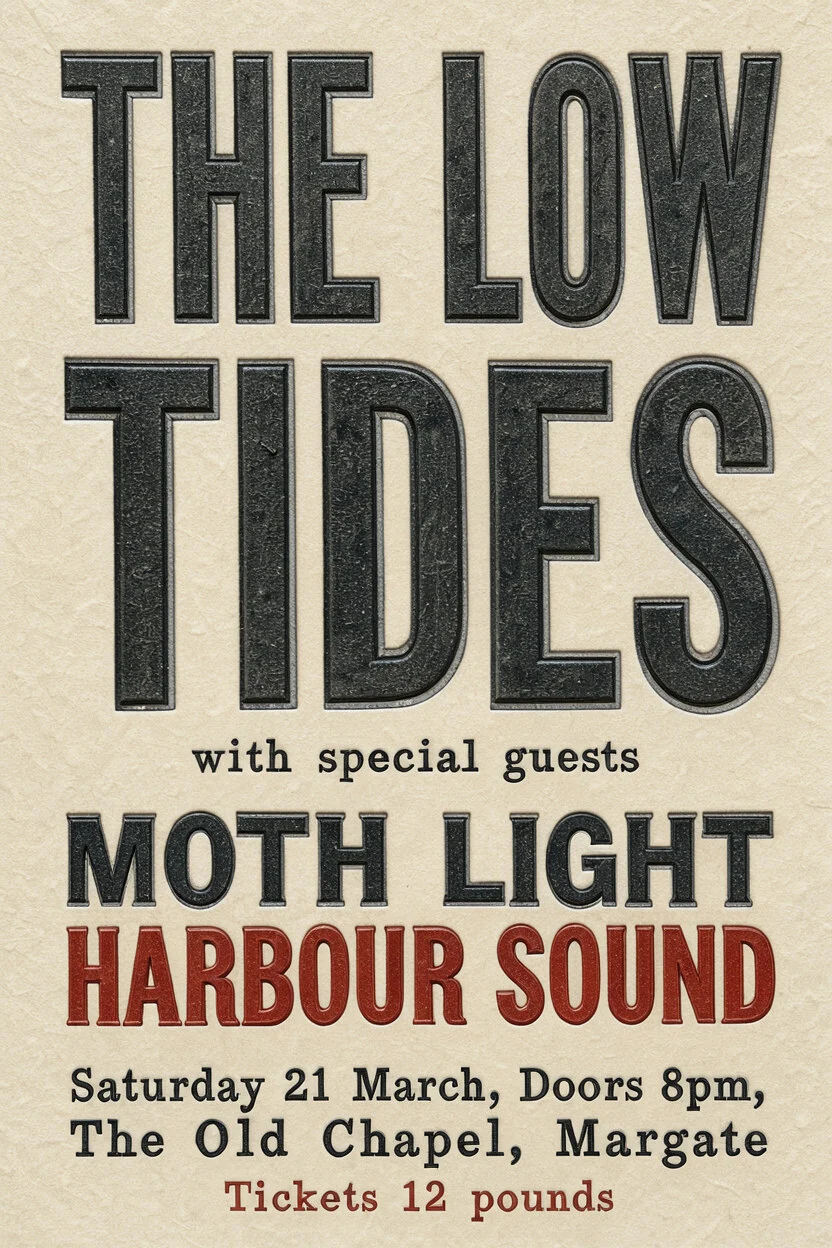
a letterpress gig poster on cream stock, wood type: 'THE LOW TIDES' very large at the top, below it 'with special guests' small, then 'MOTH LIGHT' and 'HARBOUR SOUND' medium, at the bottom 'Saturday 21 March, Doors 8pm, The Old Chapel, Margate' and 'Tickets 12 pounds' in small caps, two inks, black and brick red, nothing else written
832×1248, 16 steps, seed 1
#Pricing
FLUX 3 Image Klein is a standard open model, so Sogni Unlimited plans cover it under fair use, and it also runs on pay-as-you-go Spark. Prices use the standard peg of 1 Spark = $0.005, at the default 16 steps.
| Text-to-image | Spark | USD |
|---|---|---|
| 1024×1024 | 1.80 | $0.009 |
| 2048×2048 | 4.82 | $0.024 |
| 3840×2160 | 14.67 | $0.073 |
| 4096×4096 | 50.76 | $0.254 |
| Edit | Spark | USD |
|---|---|---|
| One photo, 1024×1024 (1 megapixel) | 2.19 | $0.011 |
| One photo, 1920×1088 (2 megapixels) | 5.35 | $0.027 |
| One photo, 2352×1776 (4 megapixels, the largest) | 14.25 | $0.071 |
| 2 references, 1024×1024 | 3.45 | $0.017 |
| 3 references, 1024×1024 | 4.88 | $0.024 |
| 4 references, 1024×1024 | 6.73 | $0.034 |
| 5 references, 1024×1024 | 8.74 | $0.044 |
| 6 references, 1024×1024 | 10.74 | $0.054 |
| 7 references, 1024×1024 | 13.69 | $0.068 |
| 8 references, 1024×1024 | 16.36 | $0.082 |
| 9 references, 1024×1024 | 19.22 | $0.096 |
| 10 references, 1024×1024 | 22.27 | $0.111 |
Text-to-image costs 1.80 Spark ($0.009) per image for any size up to about 1.5 megapixels, and more above that (1536×1536 is 2.71 Spark). Fewer steps cost proportionally less: a 4-step 1024×1024 render is 0.45 Spark. Sogni shows the estimate before a render runs; in your own app, call projects.estimateCost().
#Where you can use it
- Sogni Web: pick it under Image Editing & Mixing in the model picker, or choose it from Image Editing on Home to start an edit.
- API and SDKs: model ID
flux3_image_klein_sd_int8_convrot(example below). - Creative tools:
model: "flux-3-klein"ongenerate_imageandedit_image(see Creative tools).
#JavaScript SDK example
import { SogniClient } from '@sogni-ai/sogni-client';
import fs from 'node:fs';

const sogni = await SogniClient.createInstance({ appId: 'my-app', network: 'fast' });
await sogni.account.login('username', 'password');

const project = await sogni.projects.create({
  type: 'image',
  network: 'fast',
  modelId: 'flux3_image_klein_sd_int8_convrot',
  positivePrompt:
    'Product photo of the ceramic mug from the first image on the oak counter of the kitchen ' +
    'in the second image, morning window light from the left, shallow depth of field',
  numberOfMedia: 1,
  sizePreset: 'custom',
  width: 1024,
  height: 1024,
  steps: 16,
  // Optional: leave contextImages out for plain text-to-image.
  contextImages: [fs.readFileSync('./mug.png'), fs.readFileSync('./kitchen.jpg')]
});

const [url] = await project.waitForCompletion();
For image-to-image, pass startingImage and startingImageStrength (0–1) instead of contextImages.
#Creative tools
In hosted chat completions and creative-agent workflows, set model: "flux-3-klein" on generate_image for text-to-image or a start-image render (sourceImageIndex with starting_image_strength), and on edit_image for edits guided by up to ten reference images.