
Prompt Enhancer
Prompt Enhancer takes whatever you've typed in the prompt box — a few words, a half-formed idea, a prompt in another language — and rewrites it into a longer, well-tagged prompt that diffusion models tend to respond to better. It reorders terms, adds style, lighting, and composition cues, fits the result to your model's token limit, and drops it back into the prompt field.
It's powered by Sogni Intelligence — Sogni's own LLM API running on the Sogni Supernet. There's no third-party model provider in the loop, no separate signup, and no data leaving the Supernet.
#How to use it
In Studio, type a seed idea — a subject, a mood, a couple of keywords — and click the Enhance button next to the prompt field. The Prompt Enhancer:
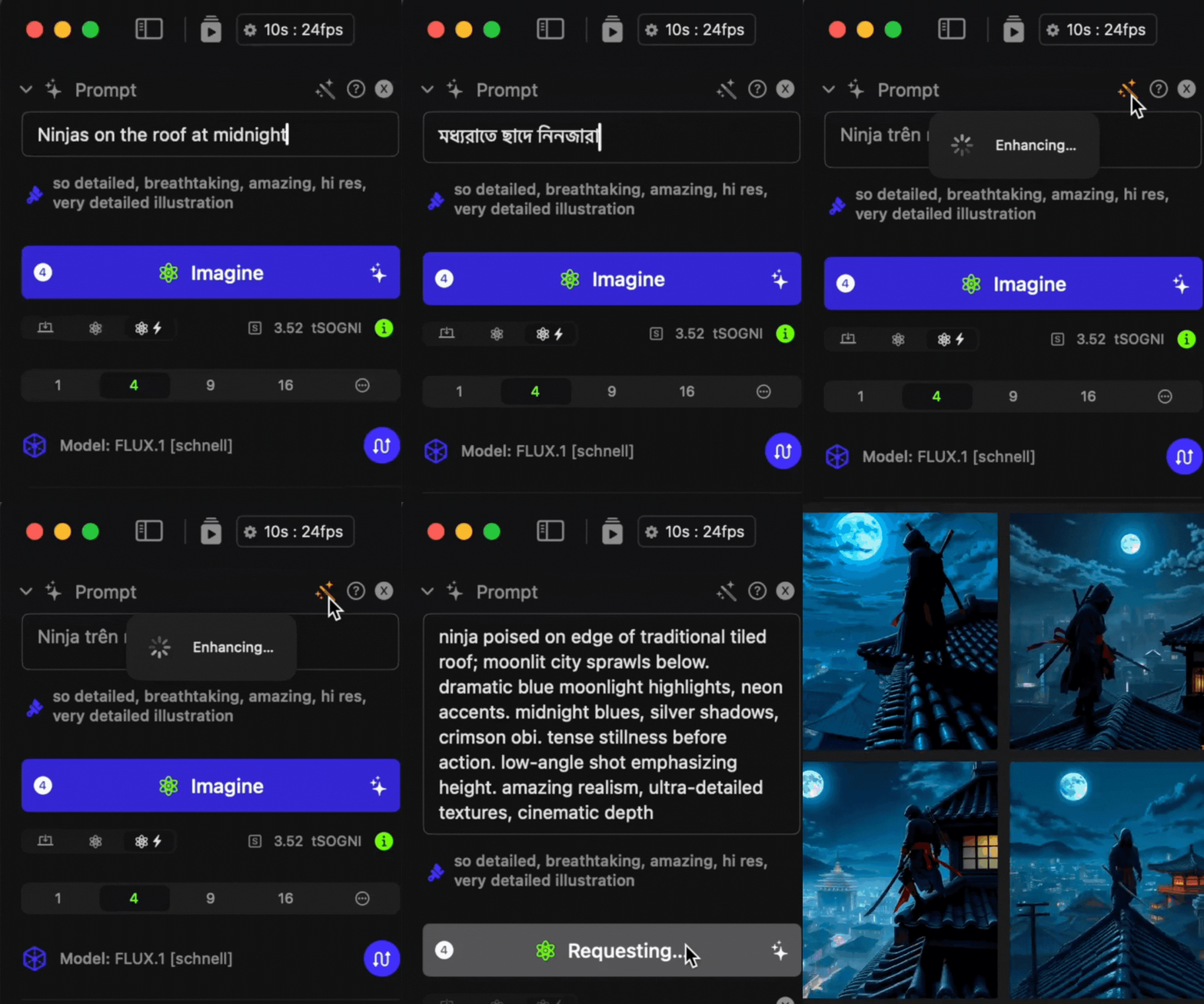
- Sends your seed text and the active model's available token budget to Sogni Intelligence.
- Receives an expanded prompt sized to fit that budget.
- Replaces the contents of the prompt field with the enhanced version.
You can run it as many times as you like — each call produces a fresh rewrite. Edit the result freely; the enhancer's output is a starting point, not a contract.
The enhancer also doubles as a translator: type a prompt in any language and it returns English, which most diffusion models understand best.
#Why it runs on the Sogni Supernet
Prompt Enhancer is one of several Sogni features that calls Sogni Intelligence under the hood. Running on the Sogni Supernet — a decentralized network of GPUs (dePIN) — means:
- No third-party LLM fees. Inference happens on Sogni's network, not OpenAI's or anyone else's.
- Your prompts stay on the Supernet. Nothing gets forwarded to an external model provider.
- One balance, all features. The same Spark you spend on image and video generation covers prompt enhancement — no separate API key, no per-vendor accounting.
The same LLM API is available to your own apps as Sogni Intelligence — it's an OpenAI-compatible endpoint with chat, vision, tool calling, and built-in creative-media tools.
#Tips
- Start with a clear subject. "Cyberpunk samurai" enhances better than "cool guy". Give the model something concrete to build on.
- Let it add the style. The enhancer is good at picking lighting, lens, palette, and composition vocabulary. Avoid front-loading those yourself — let the LLM suggest, then edit.
- Re-roll for variety. Each call is a fresh generation. If the first rewrite drifts from what you wanted, click Enhance again rather than fighting the output.
- Pair with dynamic prompts. Enhance a seed, then add
{}groups to fork it into a batch of variants. See Dynamic Prompts. - Edit before generating. The enhancer optimizes for verbosity and tag density. If you have a strong aesthetic direction, trim or rephrase the result before hitting Generate.
#See also
- Sogni Intelligence — the LLM API that powers Prompt Enhancer, available to any app.
- Dynamic Prompts — template syntax for fanning a single prompt into many.
- Prompt length & token limits — what the enhancer is fitting your prompt into.
- Prompt engineering tutorial — video walkthrough.