
Sogni Chat
Sogni Chat is a conversational creative studio. Ask in plain language and it picks the right model, runs the job on the Sogni Supernet, and streams the result back into the conversation — images, edits, video, music, and full multi-tool workflows from a single chat window.
#Launch Sogni Chat →
#Featured workflow — a 15-second Slothicorn commercial
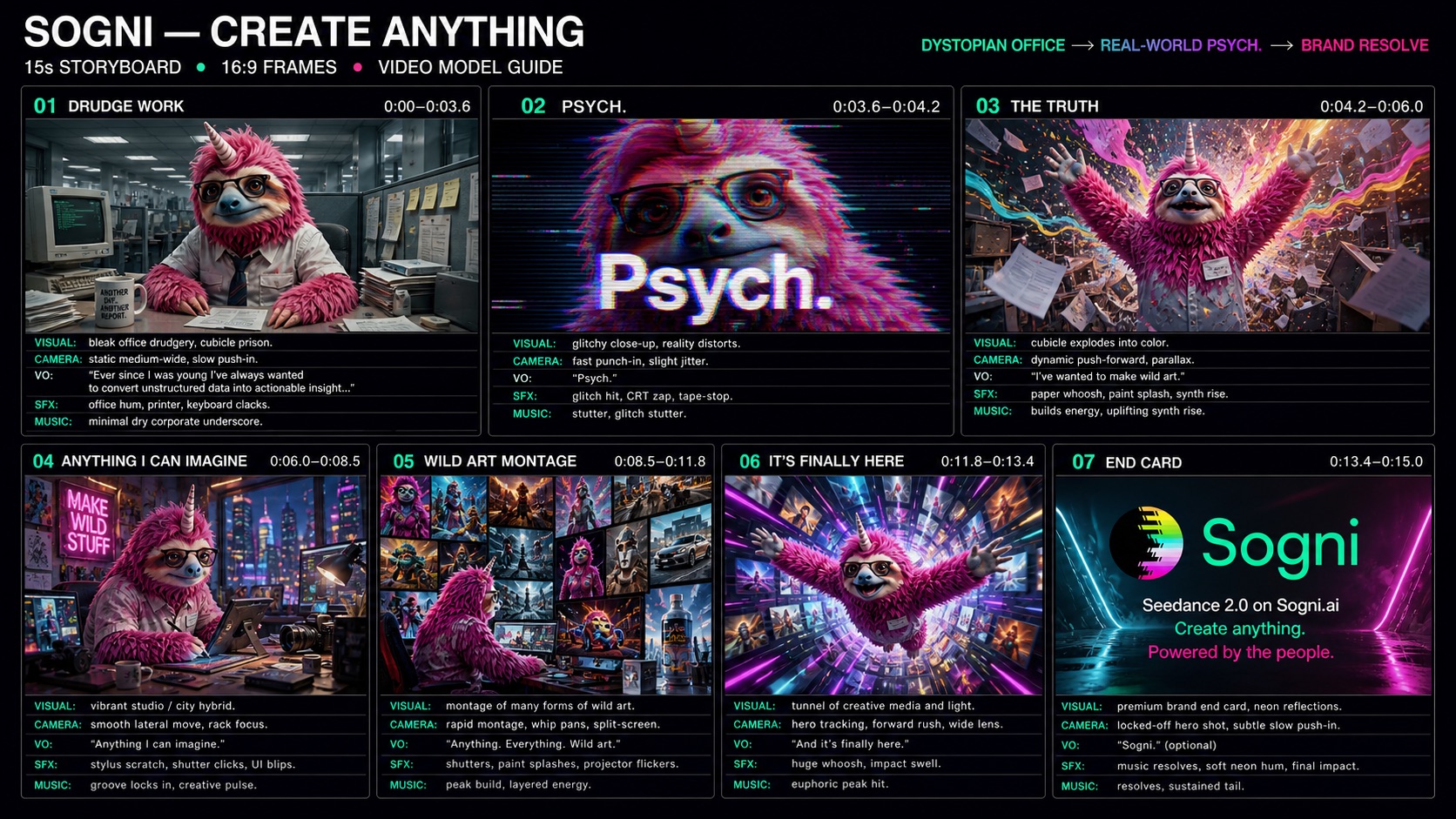
How a single chat message turns two reference images into a fully-edited 15-second commercial. The current featured workflow uses GPT Image 2.5 Sunburst for the storyboard and Seedance 2.5 at 1080p for the finished clip. The walkthrough below preserves the original GPT Image 2 and Seedance 2.0 demo labels so the model provenance of those assets remains accurate.
#Inputs


#The prompt to Sogni Chat
Generate a fun 15s video storyboard using this image of a nerdy looking fuzzy pink sloth with a little unicorn horn growing out of his forehead, our Sogni mascot. He should be slaving away at a boring desk job before being transported into a psychedelic wonderland of wild art and imagination. The pace should go from slow to insane in a slick and cool way. Think Michael Gondry style transitions and analog film effects magic. The commercial should end on our Sogni logo and slogans. Let's construct this using 7 beats. Here is a draft along the lines of what kind of dialogue I want.
"Ever since I was young I've always wanted to convert unstructured data into actionable insight…. Syke! I've wanted to make wild art. Anything I can imagine. And it's finally here."
End scene:
Seedance 2.0 on Sogni.ai
Create anything.
Powered by the people.
#GPT Image 2 lays out the 7 beats
#Seedance 2.0 renders the final video
Try it live — three demo chats are pinned under the Featured workflow · GPT Image 2.5 + Seedance 2.5 1080p panel on the welcome screen:
- Storyboard Video Demo — full GPT Image 2 storyboard → Seedance 2.0 render → finished clip.
- GPT Image 2 Demo — reference-image ad collage with polished portrait variations.
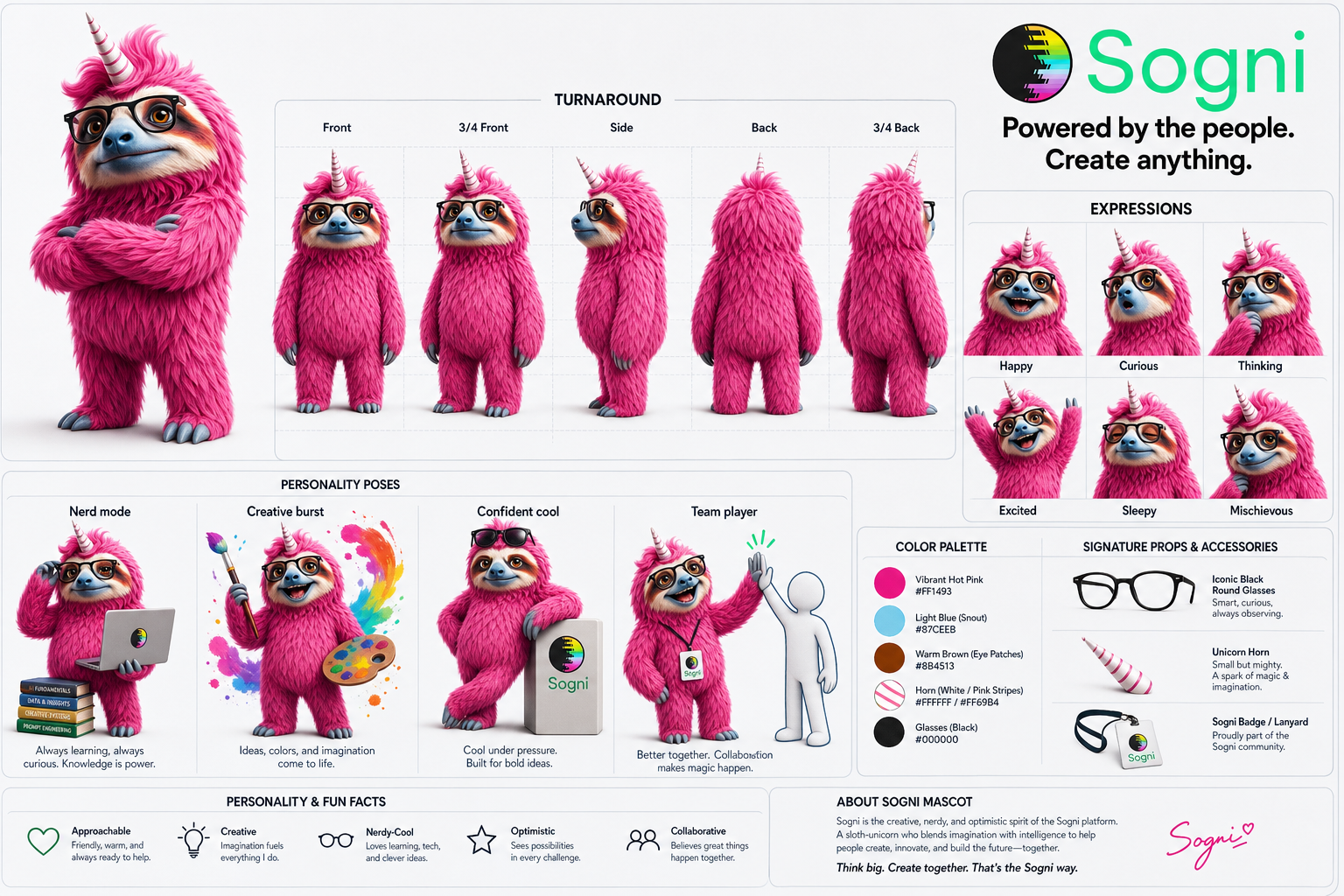
- Character Sheet Demo — reference-driven Sogni mascot sheet with brand slogans.
Each loads as a finished conversation you can scroll, replay, or fork. The pinned storyboard demo was captured on the earlier GPT Image 2 → Seedance 2.0 path. To start a new workflow: attach 1 to 16 reference images, type your concept, or both — Sogni Chat fills in any missing creative details, runs GPT Image 2.5 Sunburst, then renders with Seedance 2.5 at 1080p and streams every step back into the conversation.
#What it does
- 30+ creative tools, one chat. Generate, edit, restore, restyle, refine, re-angle, animate, stitch, dance-montage, orbit, text-to-video, sound-to-video, video-to-video, extend, overlay, replace segments, add subtitles, generate music, analyze image / video, extract metadata — all reachable through natural language. See the full catalog in the Sogni Intelligence chat tools reference.
- Multi-turn tool calling. Sogni Intelligence picks which tool to call, runs it, feeds the result back, and can chain calls across a single turn (up to 12 rounds).
- Streaming responses. Tokens, reasoning, tool progress, and artifacts all stream live — no spinners over a black box.
- Sessions that stick. Chat history, uploads, and generated assets persist locally in IndexedDB so you can pick up a project days later.
- Find past work in the cloud. Generations from your chats also show up under Recent Projects in My Media — a cloud gallery of everything you've made, available across devices, separate from the locally-cached session history.
- Reusable workflows. Save a sequence of prompts and tool calls as a named template, run it again with new inputs, or share it. See Workflow Templates.
- Built on the Sogni Client SDK. The same SDK that powers Photobooth, 360, Vibe, and the n8n plugin — every model and capability stays in lockstep across the suite.
#Workflows
Character sheet from one photo. Upload a reference, ask for a turnaround sheet, then chain Change Angle and Apply Style calls. Sogni Chat remembers the asset across turns so "now make the side view in claymation" just works.
Animate a still. Generate or upload an image, say "animate this — a slow push-in for 4 seconds," and Animate Photo handles the LTX-2.3 or Wan 2.2 call automatically.
Music-video sketch. Generate a track with Generate Music, then ask for a Sound to Video clip cut to it. Two tools, one conversation.
Save it as a template. Once a sequence works, save it as a Workflow Template with named inputs ("subject photo," "style") so the next run is one prompt instead of five.
#Tips
- Talk like a director, not a prompt engineer. "Make it feel like a 90s film still" gets you further than long Stable Diffusion incantations — Sogni Chat rewrites the brief for the right tool.
- Reference earlier outputs. "Use the third image" or "the pink sloth one" works; the chat tracks an asset manifest under the hood.
- Pin the model for tricky shots. When precision matters, name the model in your request (
Flux,Qwen Image Edit,LTX-2.3,Wan 2.2,Seedance 2.5,Seedance 2.0,Seedance Mini,HappyHorse 1.1,Wan 3,GPT Image 2.5 Sunburst,GPT Image 2.5 Flare,GPT Image 2). See the Wan 3, Seedance 2.5, Seedance 2.0, and HappyHorse 1.1 pages for model-specific workflows. - Use Wan 3 as one flexible generation model. Ask for text, first/last frames, loose image/video/audio references, or audio-driven video. Video inputs condition a new result; they are not provider-backed edit or extend tasks. Chat shapes ordinary creative briefs once and prevents Alibaba's provider expansion from rewriting them a second time; say "use this prompt exactly" when both layers must stay off.
- Use Managed Agent. The Advanced LLM settings menu has a Managed Agent toggle. Managed Agent runs the same tool loop as a durable hosted run — survives page reloads, replayable progress events, recovery on flaky connections. Same tools, same artifacts, same outcomes.
- Tweak before you spend. When a generation needs cost approval, the confirmation screen lets you edit the composed prompt — and adjust model, quality, dimensions, aspect ratio, and duration — before you commit a single token. The estimate updates with your changes.
- See what each turn costs. Billing history breaks out both media generations and chat (LLM) token spend, with a running Spark / SOGNI total.
- Generate variations in parallel. Ask for "4 different versions in parallel" or "make 3 takes of this shot" and Sogni Chat fans the call out into one round with multiple outputs to compare side-by-side instead of iterating one at a time.
- Extend an existing clip. Once a video lands, say "extend the video by 5 seconds" and Extend Video pushes past the original cut, keeping the same energy and characters.
- Regenerate a time range. "Regenerate the section from 5s to 9s in the video" re-renders just that window with Replace Video Segment — pacing and everything outside the range stays intact.
- Storyboard one MiniMax H3 clip with keyframes. Attach your images and say "make a MiniMax H3 video that starts on the first image and lands on the second at 3 seconds and the third at 6." Up to eight keyframes work on MiniMax H3 image-to-video, first/last-frame, Sound to Video, and Reference to Video. A keyframe with a new angle, place, or light starts a new shot, and when Sogni Chat asks you to approve the cost, it lists each keyframe with its time. See Intermediate keyframes.
- Overlay a watermark or graphic. Drop in an image and say "overlay this watermark on the video, bottom-right, 70% opacity for the last 3 seconds" — Overlay Video handles the composite.
- Watch the streamed reasoning. Sogni Intelligence streams its tool-selection reasoning live — great for understanding (or debugging) an unexpected route.