
Seedream 5.5 Uncensored
Seedream 5.5 Uncensored is ByteDance Seed's Seedream 5.5, the newest Seedream image model, on a more permissive content policy, served through the BytePlus ModelArk API. On Sogni its model id is seedream-5-5-uncensored. See the BytePlus ModelArk guide for the vendor's own documentation.
It is the opt-in version for creators 18 or older making lawful mature-theme work. Sogni does not offer a standard Seedream model. In Sogni Web, choosing Seedream Uncensored in the image model picker opens Seedream 5.5; Seedream 5.0 Pro Uncensored remains available as the other version.
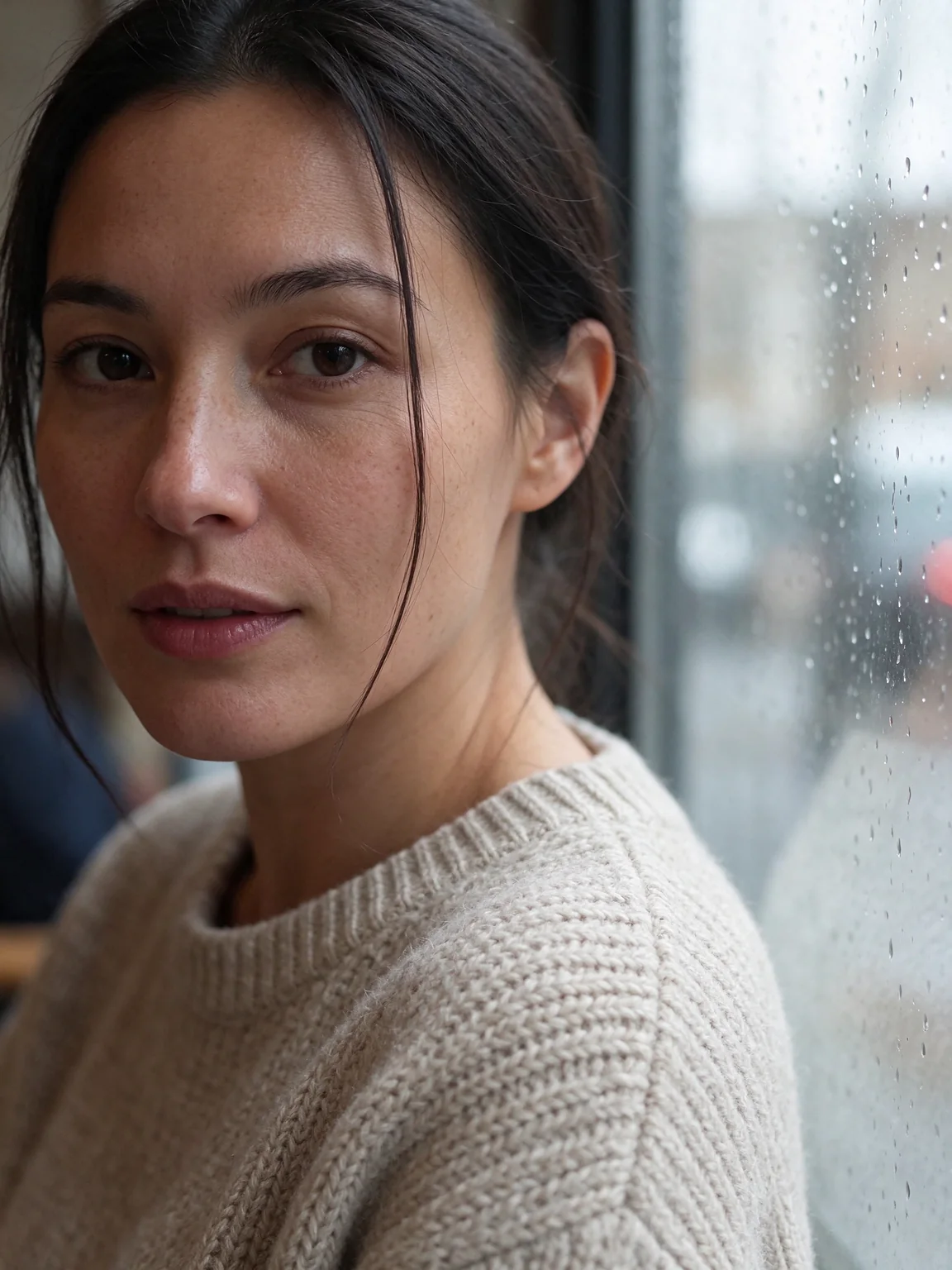
#What's new in 5.5
- Transparent backgrounds. Create an image with a transparent background from a prompt alone or from reference images, saved as PNG or WebP.
- Layer extraction. Split one image into a base image and up to 99 transparent PNG layers, each with a name, a description and its position on the base, with optional text recognition for layers of plain text.
- Larger sizes. Sizes reach the 2K tier, about 4.6 megapixels, such as 2816 × 1584 for 16:9 and 3136 × 1344 for 21:9.
Edits can build on each other. In a three-round test, a portrait got a green sweater, then gold hoop earrings, then a snowy street outside the window, and her face and the rest of the picture stayed the same from round to round.
#Capabilities
| Mode | Inputs |
|---|---|
| Text to image | Prompt |
| Image editing and composition | Prompt + 1 to 10 reference images |
| Transparent background | Prompt, with or without reference images |
| Layer extraction | One source image, prompt optional |
Refer to reference images as Image 1, Image 2, and so on, in the order you attach them, and give each one a job in the prompt: the object, the setting, the lighting. Seedream 5.5 combines objects and a scene into one picture and matches its light and reflections. Put any words that must appear in the image in quotes, and say there should be no other text.
In Sogni Web, Point or box edit lets you click a point or draw a box on one reference image and describe the change, the same way as with Seedream 5.0 Pro.
Output is PNG by default; JPG and WebP are also available.
#Transparent backgrounds
Seedream 5.5 can return an image with a transparent background, ready to place on another design: a sticker, a product cut-out, a logo or a character. It works from a prompt alone or with reference images, and the references don't need transparency of their own. Choose PNG or WebP output.
In Sogni Web, turn on Transparent Background before you create; the image is saved as PNG or WebP.
With the SDK, pass seedreamBackground:
| Value | Result |
|---|---|
'opaque' (default) |
A solid background |
'transparent' |
A transparent background |
'auto' |
The model decides from the prompt |
'transparent' and 'auto' need PNG or WebP output, and the background setting does not apply to layer extraction.
const project = await sogni.projects.create({
  type: 'image',
  network: 'fast',
  tokenType: 'spark',
  modelId: 'seedream-5-5-uncensored',
  positivePrompt: 'A glossy pair of red cherries as a sticker with a thick white die-cut border, soft studio light, isolated with nothing behind it',
  numberOfMedia: 1,
  width: 1536,
  height: 1536,
  outputFormat: 'png',
  seedreamBackground: 'transparent'
});
const [stickerUrl] = await project.waitForCompletion();
#Layer extraction
Layer extraction splits one image into a base image and separate transparent PNG layers, up to 99 of them. Each layer comes back with a short name, a description and its position on the base image, so you can move, recolor or replace one part of a design without redrawing the rest. Download a single layer or all of them.
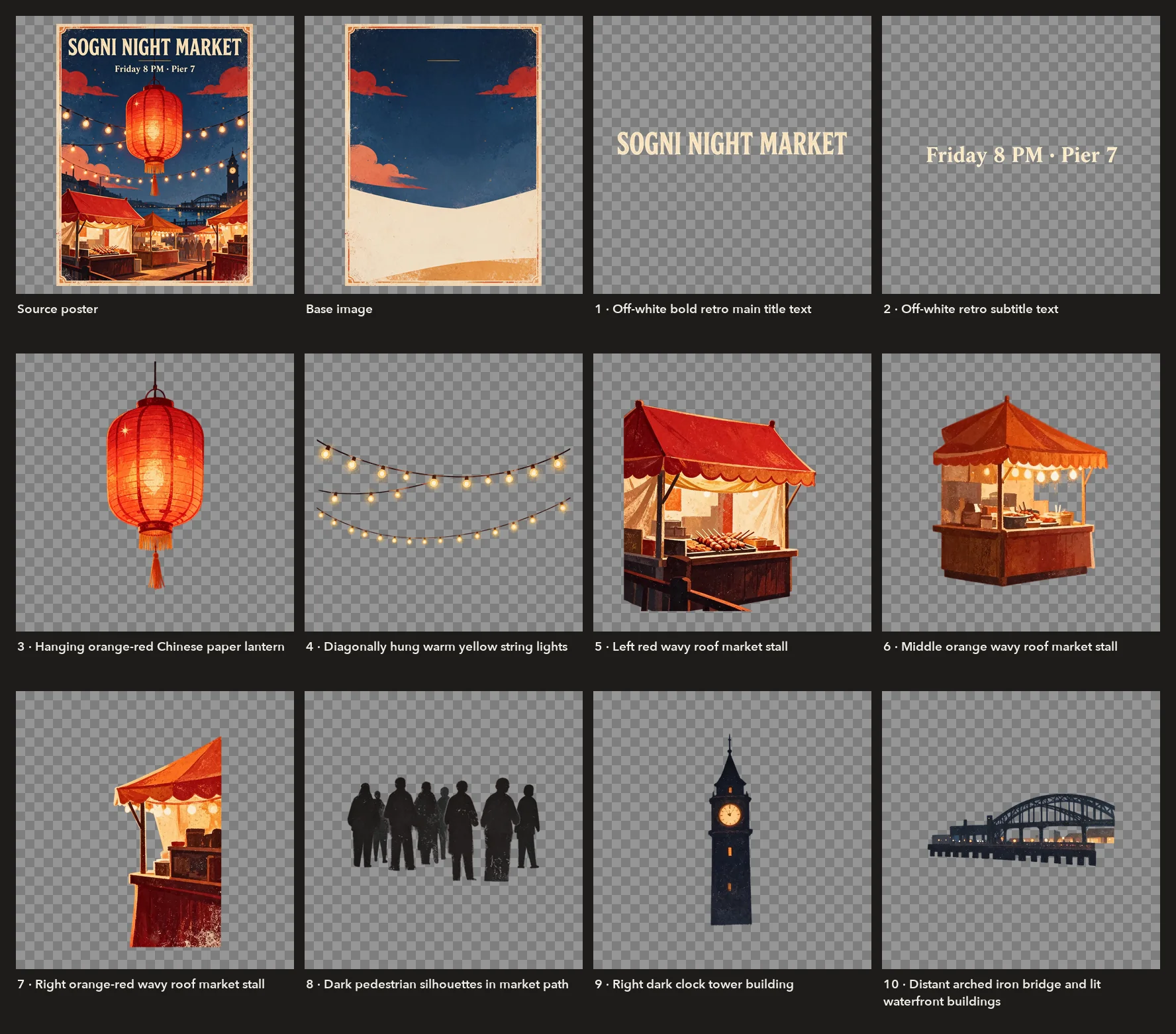
- Source. Start from exactly one image. The prompt is optional: leave it empty to split every major element, or name the parts you want, such as "the headline, the lantern and the background".
- Resolution. Choose 1K, 1.5K (the default) or 2K. The base image keeps the source's aspect ratio. Each layer keeps its own shape and is rendered near the chosen resolution, so a layer image can be larger than the area it covers on the base.
- How many layers. Set the most images to return, from 2 to 100 including the base. The default is 17: the base and up to 16 layers. The model returns as many as it finds, up to that limit: with no prompt, the poster above came back as ten layers; with a prompt naming every object and a limit of 100, the same poster came back as 33.
- Text recognition. Turn it on, and when the model recognizes a layer as plain printed text, it reads that text back with its style: the closest font family, color, bold, italic, underline, strikethrough, shadow and translucency. Both lines of the poster above came back that way; the prompted 33-layer split of the same poster returned no text. Decorative lettering and handwriting stay image-only.
In Sogni Web, add one image under Context and turn on Split into layers. Choose the Layer resolution (1K, 1.5K or 2K) and Max layers (4, 8, 16, 32, 64 or 99; 16 is the default), and turn on Recognize text to get the words back from text layers. The price shows the most the split can cost. The result shows the base image with each layer's place on it, and every layer can be downloaded as a PNG or all of them together as a ZIP.
With the SDK, pass exactly one contextImages entry, numberOfMedia: 1 and seedreamLayerDecomposition: true. job.resultUrl is the base image, and job.layers lists the layers in stacking order (zIndex 1 is the lowest layer above the base) with url, width, height, name, description and boundingBox (absolute in base-image pixels, normalized on a 0–1000 grid). Layer URLs expire; job.getLayerUrl(zIndex) returns a fresh one.
const split = await sogni.projects.create({
  type: 'image',
  network: 'fast',
  tokenType: 'spark',
  modelId: 'seedream-5-5-uncensored',
  contextImages: [posterImage],
  numberOfMedia: 1,
  positivePrompt: 'Separate the headline, the lantern, the market stalls and the night sky',
  seedreamLayerDecomposition: true,
  seedreamLayerSize: '1.5K',      // '1K' | '1.5K' | '2K'
  seedreamLayerMaxImages: 17,     // 2 to 100, base included
  seedreamLayerTextRecognition: true
});
await split.waitForCompletion();
const job = split.jobs[0];
for (const layer of job.layers ?? []) {
  const url = await job.getLayerUrl(layer.zIndex);
  console.log(layer.zIndex, layer.name, layer.boundingBox.absolute, layer.textRecognition?.text, url);
}
layer.textRecognition is present only on layers the model reads as plain text.
#Sizes
| Tier | Sizes |
|---|---|
| 1K | 1024 × 1024, 1152 × 864, 864 × 1152, 1424 × 800, 800 × 1424, 1248 × 832, 832 × 1248, 1568 × 672 |
| 1.5K | 1536 × 1536, 1792 × 1344, 1344 × 1792, 2048 × 1152, 1152 × 2048, 1872 × 1248, 1248 × 1872, 2352 × 1008 |
| 2K | 2048 × 2048, 2368 × 1776, 1776 × 2368, 2816 × 1584, 1584 × 2816, 2496 × 1664, 1664 × 2496, 3136 × 1344 |
The default is 1536 × 1536. Any size from 921,600 to 4,624,220 pixels (about 4.6 megapixels) with an aspect ratio between 1:16 and 16:1 is accepted.
#Pricing
Seedream 5.5 Uncensored is priced per image, by output size, plus a charge for each reference image. Values use the standard 1 Spark = $0.005 peg.
| Charge | Spark | USD |
|---|---|---|
| Image up to about 2.6 megapixels (every 1K and 1.5K size, such as 1536 × 1536) | 6 | $0.03 |
| Image above that, up to about 4.6 megapixels (the 2K sizes, such as 2048 × 2048 and 2816 × 1584) | 10.5 | $0.0525 |
| Each reference image | 2.4 | $0.012 |
For example, a 2048 × 2048 edit with one reference image costs 12.9 Spark ($0.0645), and a 1536 × 1536 edit with ten reference images costs 30 Spark ($0.15).
Layer extraction is priced per returned image, the base included, at the same two rates, plus 2.4 Spark ($0.012) for the source image. The quote shows the most it can cost for the number of images you allow, 180.9 Spark ($0.9045) at the default of 17, and you pay for what comes back. The poster above, split at 2K with a limit of 12 images, was quoted 128.4 Spark ($0.642) and returned a base and ten layers for 117.9 Spark ($0.5895).
It is a Premium Spark model (Free Spark can't be used) and is not covered by any Sogni subscription tier; Unlimited members save 5% and Unlimited Pro members 10%. For an exact per-job quote, use the job estimate calculator.
#Access
- 18+ and opt-in. In Sogni Web, Seedream 5.5 Uncensored appears in the image model picker only while the Sensitive Content Filter is off and you have confirmed you are 18 or older. Sogni's Terms of Service, the model provider's terms, and applicable law still apply, and every depicted person must be 18 or older.
- Sogni Web. Open it in the image creator.
- SDKs. Use the model id
seedream-5-5-uncensoredfor an image project in the JavaScript or Python SDK.
#Likeness and consent agreement
Seedream 5.5 Uncensored uses the same one-time agreement as Seedream 5.0 Pro Uncensored and the Seedance models. If your account has already accepted it, you are covered.
In the agreement you confirm that:
- the likeness in any media you upload, and in any image or video Sogni generates from it, is your own, or you have explicit, legal consent from every person shown;
- you understand Sogni or the model provider may run a real-person verification check to confirm this; and
- you agree to the Sogni.ai Terms of Service and Privacy Policy, and that violations can lead to account suspension and legal liability.
Sogni Web shows the agreement the first time you pick the model, and it is also at app.sogni.ai/account/model-consents/seedream-5-5-uncensored. The agreement can only be accepted in a signed-in Sogni app session, not with an API key. SDK users accept it once in Sogni Web with the same account; their jobs run after that. Price estimates are not gated.
A job from an account that has not accepted it fails before it is charged, with error code 4103. The model's entry in /api/v1/models/tiers carries consentRequired: { "key": "seedance-2-5-uncensored", "version": 2 }, the same key and version as Seedream 5.0 Pro Uncensored and the Seedance models, and GET /v1/account/model-consents/seedance-2-5-uncensored on the Sogni API reports whether the authenticated account has accepted it.
Need help? Ask in our Discord!
For questions about the model lineup, requests for new models, or tips — join the Sogni Discord ✨