
Sensitive Content Filter
Sogni Web, Sogni Pocket, Sogni Chat, and Sogni Studio for Mac each have their own Sensitive Content Filter switch. In Sogni Web, Pocket, and Chat, the setting controls access to optional models for mature themes. In Studio for Mac, an on-device classifier screens generated images before they're shown in the gallery.
Mature-theme generation is strictly opt-in. You can switch the filter back on at any time.
#Sogni Web
On a computer:
- Open app.sogni.ai and sign in.
- Select your username in the top-right corner of the screen.
- Under Content preferences, switch off Sensitive Content Filter.
- Confirm that you are 18 or older, then select Continue.
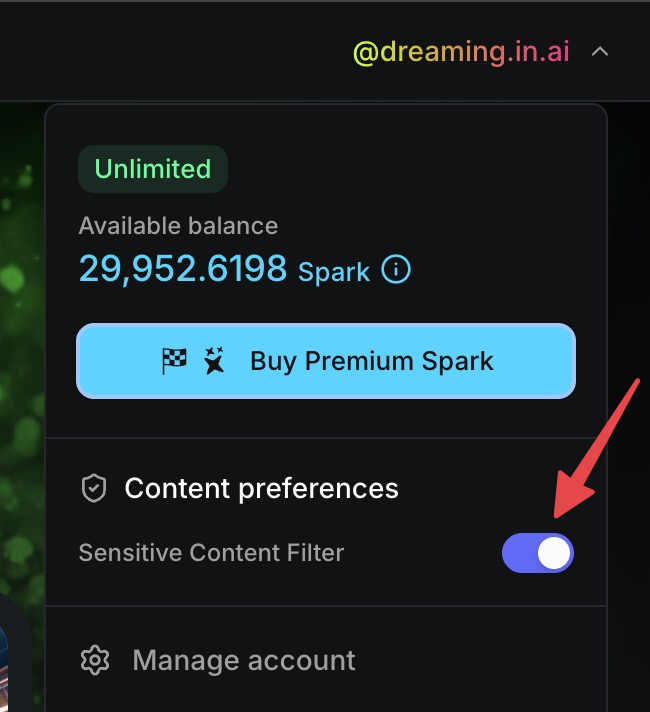
On a phone, such as an iPhone in Safari, the top of the screen has a menu instead of your username:
- Open app.sogni.ai and sign in.
- Tap the menu at the top right, then tap Manage Account.
- Under Content preferences, switch off Sensitive Content Filter.
- Turn on the switch confirming that you are 18 or older, then tap Continue.
On a phone you can also tap Content in the bottom toolbar of any create page to reach the same switch.
Once the filter is off, two more switches appear under it:
- Enable filter on startup is off by default, so the filter stays off the next time you open Sogni Web. Switch it on if you want the filter back on at every visit.
- Blur mature content (R+) is on by default. Mature results show as Sensitive content — Tap to show until you tap them. Switch it off to see them unblurred. Sogni then asks whether to Blur again next time I open Sogni. That is on by default, so the blur returns at every startup unless you switch it off and tap Done.
These settings are saved in the browser you set them in. They do not follow you to another browser or device, and clearing the browser's website data resets them. The API has its own setting — see API and SDK below.
#What switching it off reveals
Turning the filter off surfaces the mature-theme Supernet models and LoRAs, such as the Dark Beast image models, and also the vendor video models tuned for mature themes. Wan 3 Uncensored — model ID wan3.0-spicy-video — then appears under Wan 3 version inside the Wan 3 workspace. Switch the filter back on and any workspace still set to Uncensored falls back to standard Wan 3.
#Sogni Pocket
On iPhone:
- Tap More in the bottom toolbar, then Render Settings.
- Scroll down to Sensitive Content Filter, tap it, and switch it off.
- Confirm with Face ID or your passcode.
- The first time, confirm that you are 18 or older and tap Disable Sensitive Content Filter.
- To keep the filter off the next time you open the app, also switch off Enable filter on startup.
Pocket keeps its own setting on the device, separate from Sogni Web. Mature-theme models refuse to render while the filter is on, and mature-theme LoRAs appear only while it is off.
#Sogni Chat
Sogni Chat has its own Safe Content Filter switch in the account menu. When you switch it off, confirm that you are 18 or older. Choose Leave Safe Content Filter off permanently if you don't want it to come back on in your next session. For adult conversations, also pick Unrestricted or Thinking + Unrestricted from the mode menu at the top of the chat.
In Pocket's Creative Assistant, the same modes are under More → Storage, Account & Support → Settings → Creative Assistant → Model Variant.
#Who can render with the filter off
Sogni checks eligibility on every render, in every app. Renders with the filter off go through for accounts that:
- have an active Unlimited subscription or free trial,
- have bought Premium Spark at any time — this stays unlocked after that Spark is used up,
- still have Premium Spark, or
- pay for the render with SOGNI.
Other renders with the filter off are refused with "Disabling the Sensitive Content Filter requires a subscription, Premium Spark, or SOGNI".
Some features need more than that:
- Wan 3 Uncensored draws Premium Spark on every render. Unlimited doesn't cover it, and Rewarded Spark and SOGNI can't pay for it. See Wan 3 Uncensored pricing.
- LoRAs, including the mature-theme ones, need an Unlimited subscription or trial, Premium Spark you still have, or SOGNI.
- Unrestricted chat modes need an Unlimited plan, Premium Spark you still have, or SOGNI.
Sogni-hosted mature-theme models, such as the Dark Beast image models, are priced like any other Supernet model and are included in Unlimited fair-use access.
#Sogni Studio for Mac
In the right-hand Manual Controls sidebar, expand the Advanced section. The Sensitive Content Filter toggle is there alongside Sampler, Processing, and Preview Count.
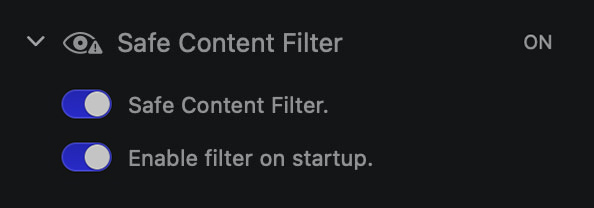
- Sensitive Content Filter ON/OFF — turn the classifier on or off.
In Video Create mode the same toggle lives in the Render Settings panel.
#How the Studio filter works
The filter is a small Core ML model that runs locally on your Mac via the Vision framework — every generated image is classified after it lands and before the gallery thumbnail renders. Nothing about your generations leaves the device for filtering purposes; the classifier weights live inside the app bundle.
When an image is flagged:
- Its gallery thumbnail is blurred.
- A tap / click reveals the unblurred version with a one-time confirmation.
- The image is tagged in metadata so you can filter the gallery by NSFW status later.
#API and SDK
On the API the filter is a per-request parameter, safe_content_filter, and it defaults to true. No switch in any app changes that, and there is no account-wide setting to turn off — send the parameter on each call:
- Chat Completions — top-level
safe_content_filteronPOST /v1/chat/completions. - Creative Agent Workflows — top-level
safe_content_filteronPOST /v1/creative-agent/workflows, and onPOST /:id/resumeto release a run that paused onsafety_review_required. - Creative Agent CLI —
--no-filter.
Turning it off needs an eligible account — see Who can render with the filter off. Sogni re-checks eligibility on every render, so an ineligible account is refused at generation time even when the parameter is set.
#When to use it
- Public demos / streaming. Keep it on so an unexpected result doesn't make it onto a shared screen.
- Shared family Macs. On at startup is the right setting.
- Concept art / private work. Off is fine when you're the only one looking at the gallery.
The filter is a screen for content visibility, not a hard generation block — the underlying model still produced the image, and clicking through always works. If you need a hard block at generation time, choose models tuned for safe content and keep prompts on the safe side.