
How Fair-Use Capacity and Queueing Work
Big render day? Great. That's what Sogni Unlimited is for. Every plan includes generous daily and monthly fair-use allotments on the Fast network, sized so most members never notice them, even on heavy creative days.
If you go on a truly heroic run (say, a marathon of MiniMax H3 videos), here's what happens, in order:
- As a big day builds, available concurrency can step down and queue priority eases off. New Fast renders take a little longer to start while lighter users get their turn.
- If you use up the full daily capacity, new Fast plan renders pause until your daily reset. Renders already admitted keep their place in the queue and still complete. The much larger monthly capacity works the same way: reach it and new Fast plan renders pause until your billing-cycle reset.
- Everything restores automatically. Your daily window runs on a rolling 24-hour cycle anchored to your own plan schedule, and the monthly capacity resets on your billing date (see Fair-use controls).
- Relaxed rendering never stops. It's included with your plan at every usage level, and while Fast is paused it takes your MiniMax H3 videos, video upscaling, and music too (see Keep video and music going on Relaxed).
Before that capacity boundary, this is the same fair-use scheduling described in the Unlimited plan reference: within each tier, daily usage is a scheduling signal, so lighter days get faster starts and everyone gets short queues.
#Why did my renders slow down?
Usually because of a genuinely big day with demanding video models like MiniMax H3. They occupy powerful Supernet workers for minutes at a time, so sustained heavy use can reduce how many of your jobs run at once and place the rest in a lower-priority queue. At the daily or monthly capacity boundary, new Fast plan requests pause instead of joining that queue. Overall Supernet demand and available worker capacity also affect wait times for everyone, at any usage level.
#Where you stand, at a glance
No guessing needed. The Usage page shows live meters for both fair-use windows, with exact countdowns to each reset:
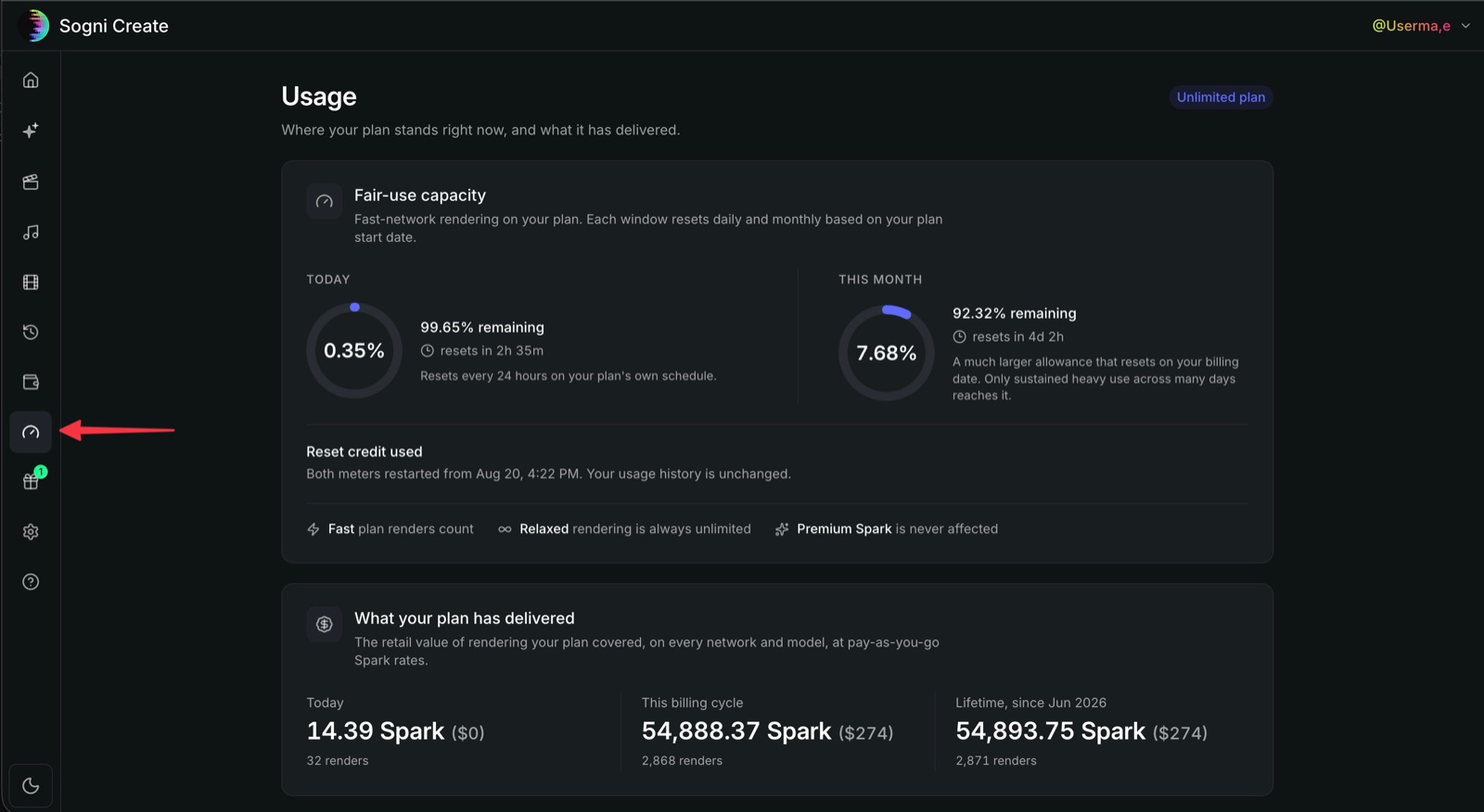 One click on the gauge icon in the sidebar shows both meters, their reset timers, and everything your plan has delivered.
#Ways to keep the renders flowing
In the slow lane mid-session? You have good options.
#Keep video and music going on Relaxed
Hit your daily or monthly Fast capacity on a paid plan? A Fast/Relaxed switch appears on the video, video upscaling, and music pages in Sogni Web. Pick Relaxed and keep creating under your plan, with no Spark spent. On a video model that Relaxed can't run, picking Relaxed takes you to MiniMax H3. Before you reach the limit, your plan covers Fast, so video and music stay there.
What to expect on Relaxed:
- Only the FastH3 tier of MiniMax H3 runs here. Turbo (LightX2V), Balanced, Standard, Reference to Video, and every other video model need Fast. Music renders on MiniMax Music 3.
- Bring patience for video. Relaxed video runs on a much smaller pool of GPUs, shared by every member who is in a cooldown. As of early October 2026, about half of Relaxed videos finish within 20 minutes and one in ten takes about four hours or more. The typical 2-stage video takes closer to two hours, and one in ten about eight. Music usually finishes in a few minutes.
- Usually one at a time. Relaxed usually runs one of your video or music renders at a time, and a Relaxed video also uses your plan's video slots, so it waits while your other renders finish.
- 24-hour limit. A render that hasn't finished 24 hours after you submit it is cancelled.
- Queued work survives the reset. A video you queue during a cooldown can still finish on Relaxed after your reset, though it may first wait behind members who are still in a cooldown. For new renders after the reset, switch back to Fast.
- Your monthly meter still moves. Relaxed renders don't use your daily capacity, but they do count toward your monthly allowance, so a long Relaxed run shows up on the Usage page.
Images work differently: for Sogni-run image models, the Fast/Relaxed toggle is available at every usage level.
#Upgrade to Unlimited Pro
Regularly rendering past the daily allotment? Pro was built for you: 4x the daily fair-use capacity, higher queue priority, and more concurrent jobs. Check the plan comparison, or hit Update Plan in Wallet & Billing.
#Use Premium Spark
Premium Spark renders bill from your Spark balance instead of your plan's allotment and get top-priority queue access. Fair-use scheduling never touches them. Buy it in-app from the Wallet page. If you never want to think about capacity again, flip on the fallback toggle on the Usage page (off by default) and renders roll straight onto Premium Spark whenever plan capacity is used up:
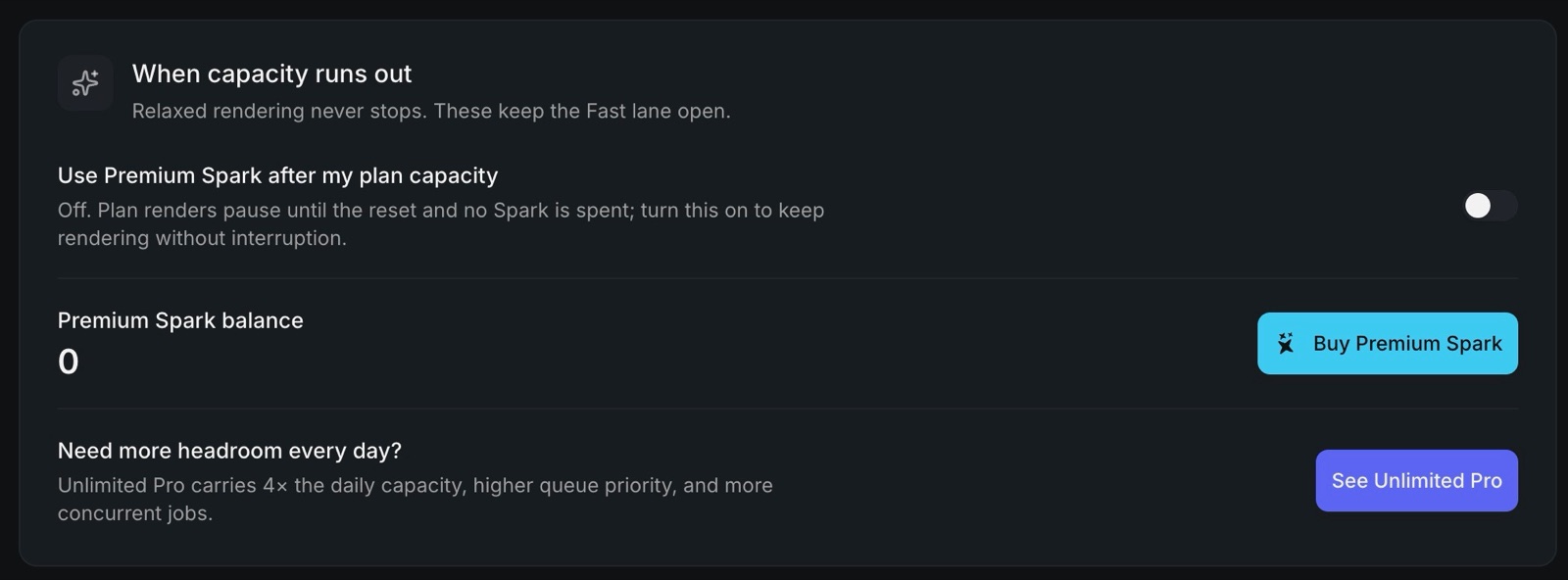 The "When capacity runs out" panel on the Usage page: the Premium Spark fallback toggle, your Spark balance, and a shortcut to Unlimited Pro.
#Let the Creative Agent do the driving
Why babysit renders one at a time? The Sogni Creative Agent can queue big runs of images and videos hands-free. The Creative Agent Skill plugs into the AI agent you already use and keeps a substantial personal queue moving all day, within your plan's queue limits.
#Or just take five
Reduced priority and capacity pauses are temporary. Already-admitted work keeps moving, and new Fast renders resume at the applicable reset: the daily window on its rolling 24-hour cycle, the monthly allotment on your billing anniversary. The Usage page counts it down to the minute. Grab a coffee and come back to a full tank.
#Enterprise
Building a product or running production volume? Use pay-as-you-go Premium Spark: it has the highest queue priority and per-account concurrency, and no daily fair-use budget. The Production Integrations guide covers billing, limits, and architecture. Need more than the published limits? Tell us what you're building at [email protected].