# Model Storage & Deleting Models

By default, models are stored in the "sd-models" folder within the app's sandboxed container in your Library. You can easily access this folder in two ways:<br>

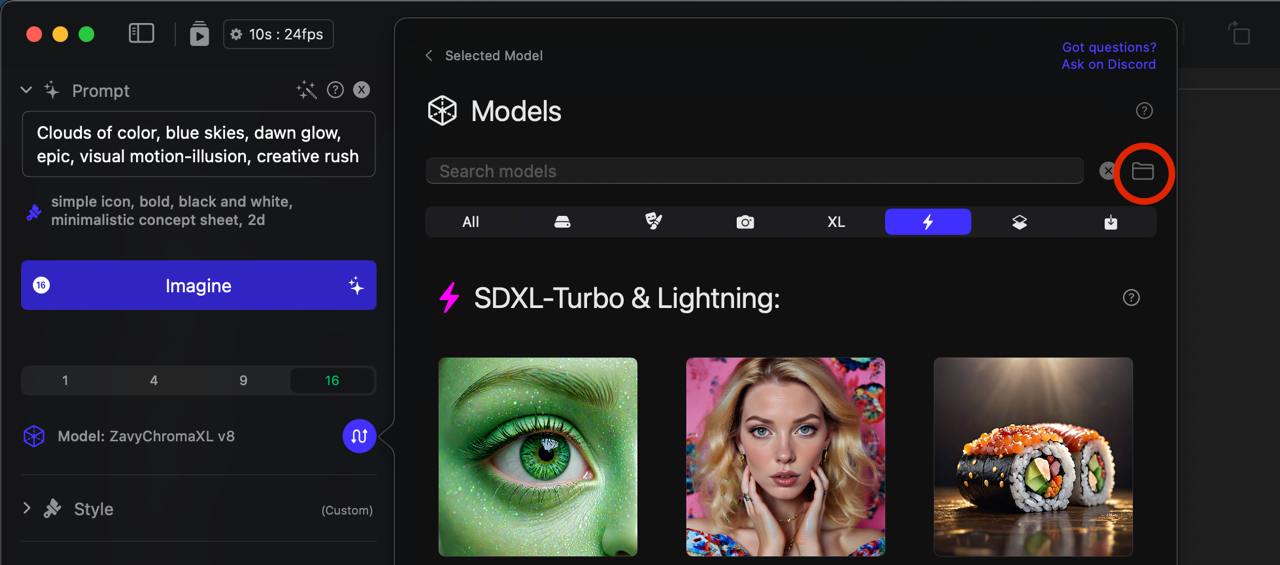
1\. From the Model Explorer, while viewing "All Models," click the folder icon at the top right of the view (next to the search field).

<figure><img src="https://3618323355-files.gitbook.io/~/files/v0/b/gitbook-x-prod.appspot.com/o/spaces%2FjGm8Y44m4zCkKjnnr9Na%2Fuploads%2FpsJbXqFeA1IA2Ideix8M%2Ftelegram-cloud-photo-size-1-5033171818432802081-y.jpg?alt=media&#x26;token=840f66a8-e148-4e56-99dc-e4e8182c0790" alt=""><figcaption></figcaption></figure>

2\. Right-click on a model and select "Show in Finder." You can also delete a model directly from the right-click menu.

<figure><img src="https://3618323355-files.gitbook.io/~/files/v0/b/gitbook-x-prod.appspot.com/o/spaces%2FjGm8Y44m4zCkKjnnr9Na%2Fuploads%2FaUNS6aBm2sJlfBDwrens%2Ftelegram-cloud-photo-size-1-5033171818432802082-y.jpg?alt=media&#x26;token=845133f4-7df1-4ce2-b86a-6ae009e74f50" alt=""><figcaption></figcaption></figure>

If you wish to change the location of the "sd-models" folder, you can do so in the "Locations" tab of the Settings window (Sogni > Settings). This allows you to use an external drive to store your models and save hard drive space on your Mac.
<figure><img src="https://3618323355-files.gitbook.io/~/files/v0/b/gitbook-x-prod.appspot.com/o/spaces%2FjGm8Y44m4zCkKjnnr9Na%2Fuploads%2FOYHUMsj4MmXFOyRTKodI%2FScreenshot%202024-08-14%20at%201.46.16%E2%80%AFPM.png?alt=media&#x26;token=a1088c88-2002-472a-879c-271cf0581731" alt=""><figcaption></figcaption></figure>
